Windows 7: Reset the Offline Files database
Offline Files problems after profile changes
Over the past year, I have seen several problems with Offline Files and redirected folders on Windows 7. Group Policy Folder Redirection often failed when folders were set to offline or shares used automatic caching. Deleting a user profile does not reset the Offline Files cache database in C:\Windows\CSC. I found several ways to reset it online and tested the following approach on a Windows 7 Enterprise client.
Requirements
- Before following these steps, use Sync Center to sync all critical files back to the redirected folder share. This procedure deletes all local data in the cache. Unsynced files will be lost permanently.
- Elevated permissions for RegEdit.exe or CMD.exe
Reset the database
There are three ways to enable the FormatDatabase flag in the registry.
Option 1: Import a registry file
Create a FormatDatabase.reg file in Notepad and import it from the command line with RegEdit.exe /s FormatDatabase.reg.
| |
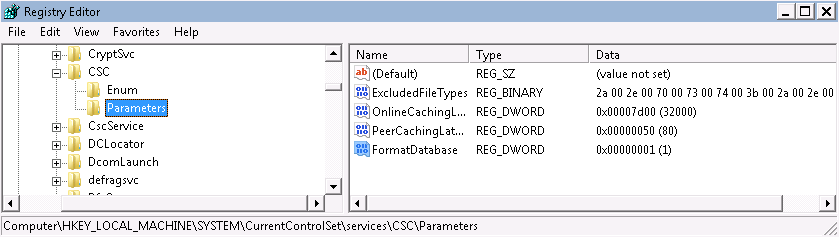
Option 2: Use Registry Editor
- Start RegEdit.exe with elevated permissions.
- Go to HKEY_LOCAL_MACHINE\SYSTEM\CurrentControlSet\services\CSC\Parameters.
- Create a REG_DWORD value named FormatDatabase and set it to 1.
Option 3: Use the command line
- Start CMD.exe with elevated permissions.
- reg add HKLM\SYSTEM\CurrentControlSet\services\CSC\Parameters /v FormatDatabase /t REG_DWORD /d 1
Check the result
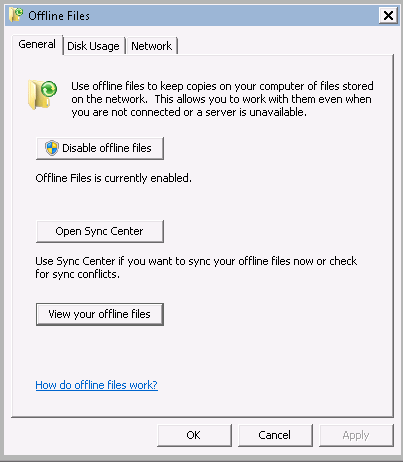
All three options produce the same result. Restart the client and log in with an administrator account. In the Offline Files control panel, select View your offline files.
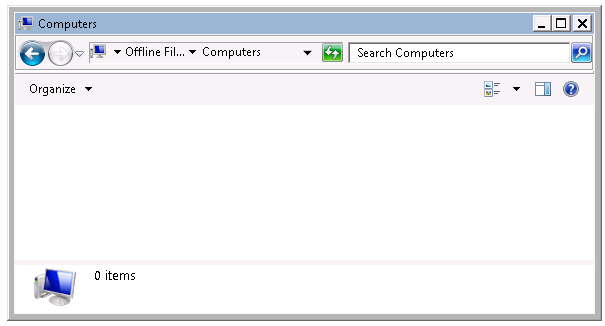
Open Computers, which should contain 0 items.
The C:\Windows\CSC database folder is now empty, giving you a clean Offline Files database.
References
17 comments
Comments from the original WordPress site, kept read-only.
Maybe you can share the problems you've had? I'm more and more for ditching offline folders all together. Several times people have lost data because of issues with it.
Btw, I think you meant to say unforgetable moments in your profile... Capturing unforgivable moments is a bit odd :)
Hi there!
I love spelling checkers. I guess I tried to find the right word and picked one suggested by the spelling checker. I am working on my new site and updates around that. So stay connected here ;-)
This is current issue I am working with Microsoft and Offline folders on Windows 7:
Microsoft-Windows-Folder Redirection Error 502. CSC database locked by another user -
http://social.technet.microsoft.com/Forums/en-US/winserverGP/thread/a0052ce8-e588-4cce-afec-a08de8a1143b/
I just now encountered this issue with company laptops that have been reissued with an additional domain profile added. Event Log shows the 502 redirection error - access denied. Your workaround resolved the issue, but I sure wish Microsoft would address this as it is a bug!
I have had success with option three. The way I implemented this was via this article:
http://cyberst0rm.blogspot.com/2011/09/how-to-delete-csc-offline-files-cache.html
Hope this helps.
Thanks,
It work perfectly with option 2.
:-)
In XP all you had to do to fix this was go to your offline files tab, hit cntrl + shift and click delete files. I can't find that option in 7. Why in the world would they remove this ability and make you have to use a reg hack to fix it?
Outstanding, the fix worked great! I used option 2.
I'm using Windows 7 x64 Professional.
Thanks to all for posting your comments.
I've never ran into so many problems with offline files until Windows 7. Not that it worked great before, but just not the issues. It seems a little finicky.
Thanks for your solution. It worked like a charm!
I had 12gb the folder CSC\v2.06.
I did as above, and now al folders show 0gb.
I had 48gb total in the partition before and still have the same 48gb, so the files have not been released or I should have now 36gb in total.
I tried option 2, and it didnt work for me :(
I am not able to bootup the system after making the registry chnages.All i have to do it then, going to safe mode good configuation and again start the system
The option 2 worked for me to enable the offline files service, thanks!
Option 2 with minor adaptation for domain situation:
- Add DWORD to registry
- add domainuser account tot workstation's local admin group
- reboot
- remove domainuser account from workstation's local admin group
- reboot/logoff
Works like a charm, thanks for sharing!
Want to try these options but need to ask something first.
I want to direct my offline files to back up to a second HDD in my laptop "D" drive. How can I do this effectively.
Thanks in advance
Added the key-----BSOD on startup
Windows tried to repair ------could not repair
Booted into safe mode and deleted the key-------everything works fine but the corruption is still present.
Hi Ivan !!!
This is Eduardo Ojeda from Monterrey, Mexico. I have a problem unrelated to offline files.
I have NAS (Synology) connected to my home network. Both, the NAS and my Laptop running Windows 7 Ultimate 64bits have Network Discovery turned on..
The NAS does not appear below "Networks" in Windows Explorer.
If I run a Netscan (from SoftPerfect Research) on my Laptop, it finds the NAS unit with its IP address and MAC address.
I don't understand why Windows 7 cannot see the NAS unit. Is there a way to flush/purge/delete cached information about this NAS device so Windows can find it again?
Regards,
Ed
Same as John...
Added the key—–BSOD on startup
Windows tried to repair ——could not repair
Booted into safe mode and deleted the key——-everything works fine but the corruption is still present.