VMware: Back up and migrate a small vCenter database
VMware vCenter Server uses a SQL database to store its data. For a small deployment, the installer offers a Microsoft SQL Server 2005 Express instance.
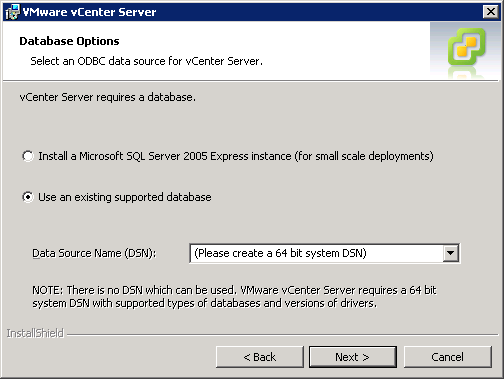
I installed the local SQL engine on my vCenter virtual machine and now wanted to move its database to a central SQL Server.
This is how I migrated VIM_VCDB from the local SQL instance to the central server.
Back up the local vCenter database
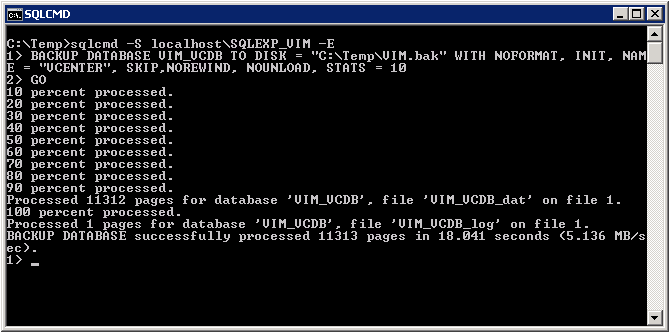
Open an elevated command prompt. I am working on Windows Server 2008 R2. Run:
| |
This connects to the SQLEXP_VIM named instance on the local SQL Server 2005 Express installation.
| |
BACKUP DATABASE creates VIM.bak from the local VIM_VCDB database.
I copied VIM.bak and restored it with Microsoft SQL Server Management Tools. I added the computer account to SQL Server security and assigned database ownership. Then I opened ODBC, changed the System DSN to point to the central SQL Server and restarted the VMware VirtualCenter Server service. Everything was running again.
Uninstall the local SQL Server instance through Add/Remove Programs.
3 comments
Comments from the original WordPress site, kept read-only.
Update so fast.
Hey Vigo,
Good to see you here!
While working today on the vCenter server I made some notes and published that to my site. I have used same procedure before but with a WSUS database.
Check out this post. On the vCenter server the sqlcmd tool was installalled out of the box now.
How to backup or export a WSUS 3.0 database?
Thanks for sharing this, It works easily and to backup