App-V: Migrate content-share references for OSD and icon files
When engineering information systems, it is important to make decisions that will remain useful for years. Two years ago, I implemented a full App-V infrastructure with a central management server and branch-office streaming servers.
The system was ready for the Windows 7 migration. During installation, I ran into a network issue involving RTSP protocol inspection and decided to install the management server in a branch-office location. The server was in a hosted third-party data center, with firewall infrastructure in between. That infrastructure was a black box to me, and I lacked the insight needed to resolve the problem.
After the Windows 7 migration, the server remained in a location with many local dependencies and potential network outages. We had more than 100 virtual packages in the system. I researched the configuration changes needed to move the server and realized that doing them manually would be a large job.
Move to the new management server
Another central server was already waiting for the management role, but communication initially did not work. I needed to redirect all App-V clients from one management server to the other. Reallocating the server was an option, but I wanted to minimize the server footprint and licenses.
The solution was to let clients communicate with the new management server over RTSPS. The database was already at the central site, so I installed another management server using it. Both management servers shared that database and could publish applications.
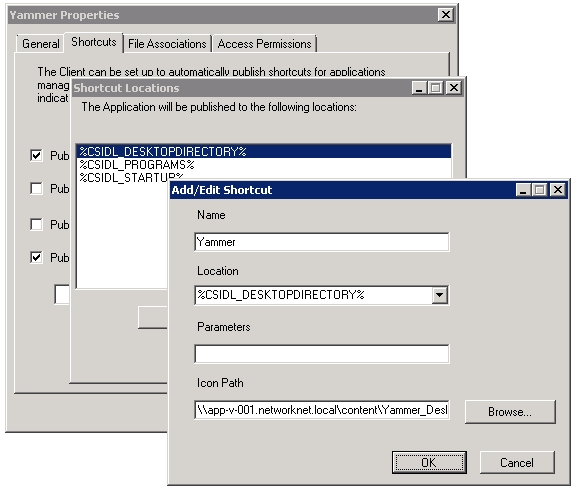
The remaining challenge was changing all hard-coded links for the imported applications to point to the new management server. I logged on to SQL Server and examined the App-V database and tables. After an hour or two of investigation and initial testing, I had the SQL statements.
Prepare the database changes
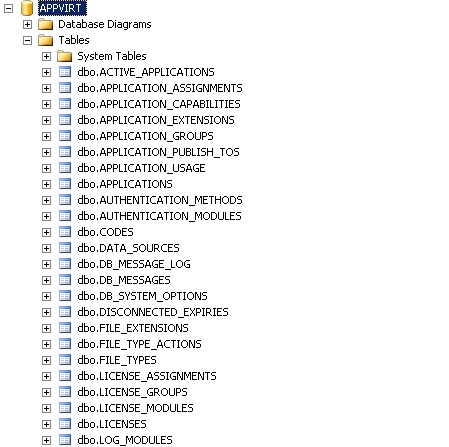
The App-V SQL database contains 47 tables. These four hold references to the content share containing OSD and icon files:
dbo.APPLICATION_PUBLISH_TOSdbo.APPLICATIONSdbo.FILE_TYPESdbo.SYSTEM_OPTIONS
Test these scripts in your own lab before implementing them. I ran the SQL statements on my lab App-V server and verified that they worked. Review client and server event logs, App-V logs and the functionality of the App-V packages.
Update the OSD and icon locations
The following SQL statements replace OSD and icon file references from the first server with references to the second.
My old management server was app-v-001.networknet.local. I wanted to migrate to app-v-002.networknet.local, keeping the same content share name.
Stop the Application Virtualization Management Server (AppVirtServer) service on both management servers. I then logged on to SQL Server and ran the statements in SQL Server Management Studio.
Imported applications: dbo.APPLICATIONS
| |
Published shortcuts: dbo.APPLICATION_PUBLISH_TOS
| |
File types and icons: dbo.FILE_TYPES
| |
System options: dbo.SYSTEM_OPTIONS
| |
Redirect the clients
I started both AppVirtServer services and changed the GPO that assigned the App-V management server. After the GPO refreshed and the App-V client restarted following a reboot, redirection to the new management server and content share worked.
I closely monitored C:\Program Files (x86)\Microsoft System Center App Virt Management Server\App Virt Management Server\logs\sft-server.log on the first management server to make sure no App-V clients were still communicating with it.