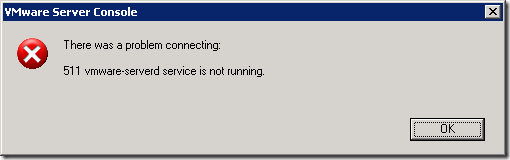
VMware Server: 511 vmware-serverd service is not running.
At some point, my Windows-based VMware Server host ran out of disk space while running a couple of important production virtual machines. Windows reported low disk space, with only 32 KB left. When I tried to open the VMware Server console, I received the error "511 vmware-serverd service is not running." All the virtual machines were running except the one that had consumed the remaining disk space.
Recover the virtual machines and service
To resolve the issue, I had to:
- Shut down one of the virtual machines through a Remote Desktop connection.
- Move the virtual machine directory to another VMware Server host.
- Shut down the other virtual machines through Remote Desktop connections. At some point, I could not shut down the two remaining virtual machines. Neither was accessible through RDP, and the Linux machine was also inaccessible through SSH.
I opened Task Manager and located the remaining processes for the virtual machines.
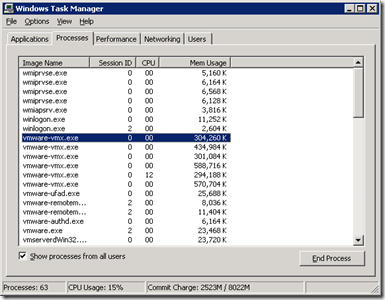
Each virtual machine has its own vmware-vmx.exe process. Two were left, and I stopped both vmware-vmx.exe processes. I then opened Services.msc and restarted the "VMware Registration Service" service.
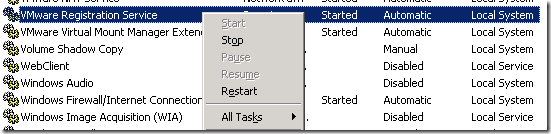
After the service was restarted, the power-on task started. All virtual machines were up and running. Stopping the processes and moving some directories resolved the problem with my VMware Server.
This brings me back to why it happened. One important lesson was to size the virtual machines and their disk space. I plan to implement thresholds and notifications with a CactiEZ appliance soon.
28 comments
Comments from the original WordPress site, kept read-only.
It's a very good post.
Thanks for the help.
Ram
Windows Registry Editor Version 5.00
[HKEY_LOCAL_MACHINE\SYSTEM\CurrentControlSet\Services\VMAuthdService]
"DependOnService"=hex(7):76,00,6d,00,78,00,38,00,36,00,00,00,77,00,6d,00,69,00,00,00,00,00
This is the fix, copy the above to a file with a .reg extension and run it. It will add a dependency to the VMWare Authentication service
Thanks a lot to Mike D.
I had a similar problem running VMware server 1.05 on a 2kpro.
The missing wmi dependency caused a fault in Auth service start that caused a fault in registration service start.
With his fix, everything works fine.
Claudio Laurita
I have no VMware Registration Service. What I have to do?
Very helpful post. Thank you
thanks a lot..
XD
Thanks....
Thank you! this post help me to solve problem :)
Fantastic! Was stuck with this error and following your article got it working. Keep writing good solutions like these.
Thanks,
Arun.P.C
www.arunpc.com
Thank you.
Your post helped me resolve my problem
thanks a lot..very helpful
Thank you!!!!
Good post
thank u for help !!!!!!!!!!!!!!!!!!!!!!!!!!!!!!!!!
thanks you, very helpful post!
Very useful Info. Thanks a lot!
Make D, thanks a lot!
Thanks Ivan! This post addressed my problem.
Hi all,
Thanks for this suggested fixe but it does not fixe my issue.
I applyied this fixe provide by Mike but no success.
I uninstalled VmWare then reinstalled it: issue still present.
Any ide is very welcome.
Thanks,
Hi abo,
did you upgrade your vmware server version?
what is your current one?
very good post, thanks!
I use XP os
I execute this command :
C:\Program Files\VMware\VMware Server\vmserverdWin32.exe
than i solve this problem!
This helped a lot. thanks!
hi,
when i start vmware it is showing "vmware authorization service is not running" .
thank you !
I just do as 21#said,and it's solved in XPsystem.
awesome :)
It resolved my issue :)
Great site and thanks for your help!
Thanks a lot!!!!!
Thanks a lot. It helped me!!