CentOS: Change the hostname
CentOS is my preferred Linux distribution. Today I needed to change the hostname of a virtual guest running CentOS.
Change the hostname
There are several ways to do this, but I use the old approach: vi is still my friend. I am working through a remote SSH session to a virtual machine; the same steps can be performed at the console.
- Sign in with putty.exe.
- Go to /etc/sysconfig/.
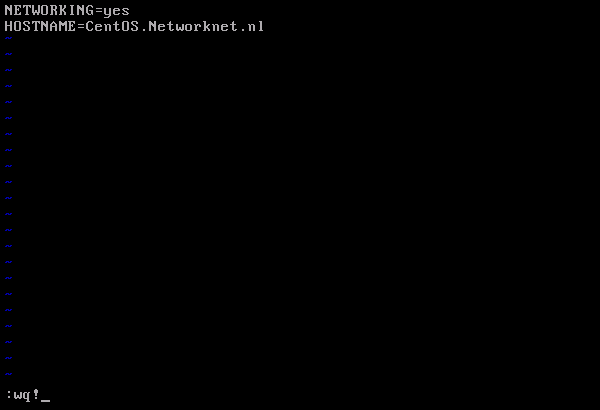
- Type vi network.
- Press i and change HOSTNAME to the server name you want.
- Press ESC.
- Save the configuration with :wq!.
- Log off or reboot.
That's all!
Related
34 comments
Comments from the original WordPress site, kept read-only.
# system-config-network
and change hostname under DNS tab, logout then login again would do also.
You don't need to reboot, just logout and login.
echo "newhostname" > /proc/sys/kernel/hostname and you dont need to reboot. Reboot is just for new kernel ;D
I have changed hostname, on a CentOS 5.3 on VMWare player, but after the change the startup becomes extremely slow, even opening Terminal takes 30s.... I have made sure the entry in the DNS tab in system-config-network is correct, and restarted.... if I restore the previous hostname value (bagvapp) the respose times become normal again...
anybody experiencing the same problem?
ah ok I forgot to add the new hostname in the 127.0.0.1 entry in the hosts file...
the procedure is described here:
http://javamonamour.blogspot.com/2009/06/centos-change-hostname-and-ips.html
/etc/init.d/network restart will do after change the hostname. :)
And you can also type as root in console: "setup" and then go to "Network Configuration" and edit the DNS config.
And you may want to check your /etc/hosts
Thanks guys, but the TheBigK's solution don't persist before restart.
The Umarzuki and Bob solutions are OK.
Muchas gracias, Thank to all.
Sorry for my bad english.
don’t persist "after" restart... is the correct form...
Sorry again.
Good luck.
no need to restart :
hostname -v yourhostname
This is a nice guide.
Most control panels have GUI to do this for novice users.
edit /etc/sysconfig/network then do service network restart.
Thanks MAN its works!!!
I'm running CentOS under a VPS and writing to /proc/sys/kernel/hostname is not allowed (not even as root).
I followed the link in Pierluigi's post and ended up adding this line in /etc/sysconfig/network
HOSTNAME="plain.domainname.com"
This worked for me and the setting persisted after reboot. Full article here:
http://www.ducea.com/2006/08/07/how-to-change-the-hostname-of-a-linux-system/
Cheers!
kaintze's instructions are good, but don't forget to change /etc/hosts!
thank u.
it work!.
Setting a new VPS server and it worked like a charm
Thanks
I needed this for a customer, thank you very much.
Thank you, it works!
I to get slow boot times after doing a "hostname example.com" I do not recommend "trying" commands to see if they "worked" or not. These are sensitive settings that have a great impact on performance.
If you don't "try" commands, how will you ever accomplish what you're trying to fix/change? Apparently you also don't pratice what you preach since you "tried" it as well and I'm sure have "tried" other commands before too......silly rabbit, *nix aren't for kids
ADRIAN, I do not believe your issue is the hostname change. you might other issue going on.
changing the hostname should not have any effect on performance....
worked fine, thanks a lot!
michael solution is the best and easy to do. After you can check /etc/hosts to see if the new hostname is there or not. If it's not, just modify the hostname file with the new hostname. That's it, no need for reboot.
thank you .
Why not use nano? :3
I have a centos6.0 system, suddenly it hanged and when did reboot and log in with user root then i get no any data on my desktop of root, When i open Terminial then i get
-bash-4.1#
how can i recover all data and change terminal shell
-bash-4.1 # to [root@dhcppc13 ~]#
please help me
nano > vi
perftect !!! thank you!!!
All you have to do is give the following command accompanied with the new hostname...
hostname -v server.example.com
My CentOS came up initially with a wrong name that it pulled from DNS that originally had the IP that it picked up via DHCP. I changed this name in hosts, network, dns, but still it shows the old name at root@wrongname.
Hi, I check your blog regularly. Your story-telling style is witty, keep up the
good work!
Appreciating the time and effort you put into
your website and in depth information you present.
It's great to come across a blog every once in a while that
isn't the same old rehashed information. Fantastic read!
I've saved your site and I'm adding your RSS feeds to my Google account.
Magnificent beat ! I would like too apprentice while you amennd youjr web site,
how can i subscribe forr a blogg website? The account aided me a acceptable deal.
I had been a little bit acquainted off this your broadcast
provided bright clear concept