Cacti: RRD graphs stop updating and the web interface is slow

I have two identical Cacti (0.8.6h) virtual machines, both based on CactiEZ version 1. I had been migrating them between VMware hosts when, at some point, my second Cacti appliance stopped updating the RRD graphs and its web interface became very slow. I tried rebooting and changing parameters in Configuration Settings, but nothing helped. I even moved the virtual machine back to its original VMware host and saw the same symptoms.
Inspecting the Cacti database files
I logged in over SSH, went to the Cacti database folder and listed its files.
Shell> cd /var/lib/mysql/cacti
Shell> ls -all
-rw-rw---- 1 mysql mysql 303340164 Apr 15 09:32 poller_output.MYD
-rw-rw---- 1 mysql mysql 119115776 Apr 15 09:32 poller_output.MYI
The poller_output.MYD and poller_output.MYI files were very large, and mysqld was using a lot of resources. The two files had a total size of 366 MB, while the virtual machine had only 384 MB of memory assigned.
Clearing the poller output
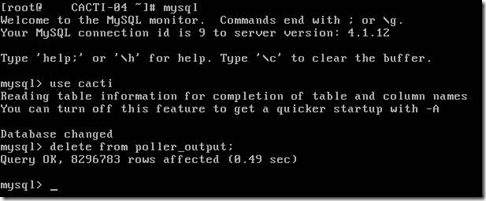
I read a couple of posts on the Cacti forums and decided to clear the poller_output table from the shell.
Shell> mysqld
mysql>use cacti mysql>
delete from poller_output;
mysql>exit
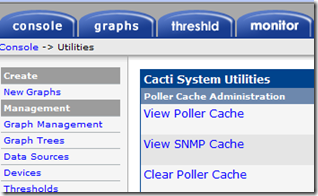
I also went back to System Utilities and ran Clear Poller Cache.
Two days later, my Cacti appliance is running smoothly and the poller_output table is small ;-)
-rw-rw---- 1 mysql mysql 28880 Apr 17 18:25 poller_output.MYD
-rw-rw---- 1 mysql mysql 32768 Apr 17 18:25 poller_output.MYI
1 comment
Comments from the original WordPress site, kept read-only.
thanks ;)