Microsoft Office InfoPath 2007: Form cache error
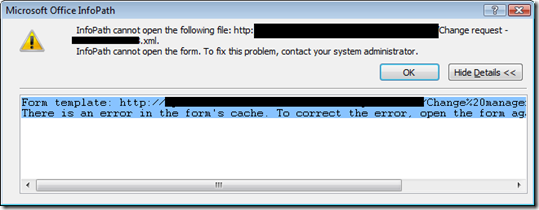
For weeks, my local InfoPath 2007 installation could not open forms stored on the SPS server. It displayed this warning:
| |
The following steps solved the problem. Clear the Internet Explorer cache before you start.
Windows Vista
Locate C:\Users\%Username%\AppData\Local\Microsoft\InfoPath\FormCache2 and delete the entire folder. If that fails, rename the subfolders to something else, such as abc, and try again. I received a warning and the action failed when I did not rename the folder.
Run:
| |
Windows 2000/XP
Locate C:\Documents and Settings\%Username%\Local Settings\Application Data\Microsoft\InfoPath\FormCache2 and delete the folder.
Run:
| |
My InfoPath forms opened again after these steps.
1 comment
Comments from the original WordPress site, kept read-only.
THANKS!!!