VMware ESX: Hyper-V and memory overcommitment
Hyper-V Manager reported an error when I tried to start my fourth virtual machine:
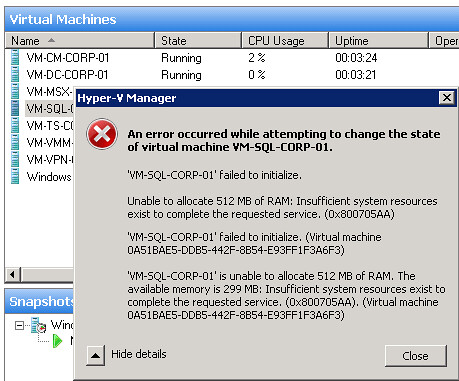
Before reinstalling my test Dell PowerEdge 2900 quad-core server, I wanted to share this. Hyper-V does not support memory overcommitment, and I don’t like that limitation. The virtual host has 8GB of RAM, and I want to run more than six VMs. The OS uses almost 1GB, leaving less than 7GB available for the VMs.
A few weeks ago, I read about memory overcommitment on VMware ESX/ESXi servers:
What is Memory Overcommitment?
Memory overcommitment is not a feature in itself, but a collection of technologies out of which “transparent page sharing” is the most interesting in my opinion. The usefulness of transparent page sharing will spring to mind immediately if you consider VDI environments. There, host machines typically run large numbers of identical client operating systems with the same applications installed on them. Since all the clients/guests run the same application set, most of the code pages they need to keep in memory are identical. Each guest keeps separate copies of all system and application EXEs and DLLs in memory - what a waste!
Now consider the following: in memory program code is organized in units of pages. If you had a component that identified all those identical pages in each guest’s virtual memory and map them to one set of pages in the host’s physical memory, you could reduce the code memory footprint of n virtual machines to that of one single virtual machine. And that is in a nutshell what VMware’s “transparent page sharing” does.
I only want to run different VMs with Windows Server 2003 or Windows Server 2008 and install additional components to test them together. With Hyper-V Server, I can only commit the physical memory available.
Related links
- VMware vs. Microsoft: Why Memory Overcommitment is Useful in Production and Why Microsoft Denies it
- http://blogs.vmware.com/vmtn/2008/03/memory-overcomm.html
- http://blogs.vmware.com/virtualreality/2008/03/more-on-vmware.html
1 comment
Comments from the original WordPress site, kept read-only.
Hi there just wanted to give you a quick heads up.
The text in your content seem to be running off the screen in Ie.
I'm not sure if this is a format issue or something to do with web browser compatibility but I thought I'd post to let you know.
The design look great though! Hope you get the problem solved soon.
Thanks