Windows XP: Missing UNIDRV.DLL or UNIDRVUI.DLL
While installing the screen capture application Snagit, Setup asked me to provide two DLLs: unidrv.dll and unidrvui.dll. I searched c:\windows\inf and c:\windows\system32\drivers, but neither directory contained the files.
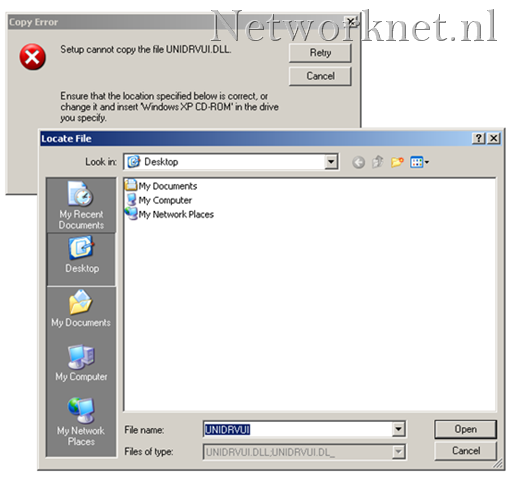
The installation completed successfully. After a reboot, however, the application reported that its printer was not installed. I uninstalled the application and started again, this time with some tips on where to find the missing files.
Find the missing files
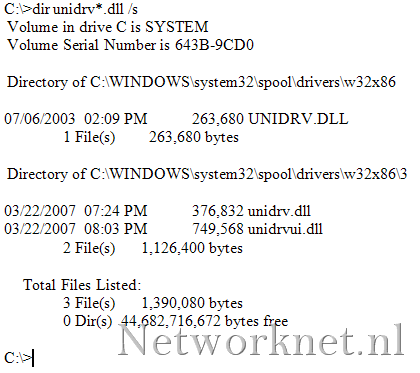
Open “Command Prompt” and run:
| |
I found my files in C:\WINDOWS\system32\spool\drivers\w32x86.
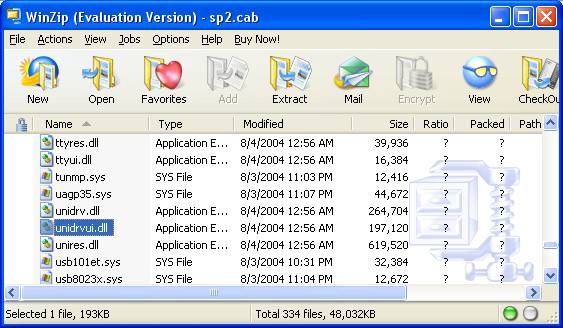
If you cannot find the files, open C:\WINDOWS\Driver Cache\i386\sp2.cab, if available, and extract the two DLLs.
This fixed my problem without downloading untrusted DLLs from the Internet. If you search for these files online, make sure you know what you are downloading.
7 comments
Comments from the original WordPress site, kept read-only.
For Windows Vista Home Premium 64BIT I found it under C:\Windows\system32\spool\drivers\x64\3
Thanks for the help
THANK YOU!!
I found UNIDRV.dll in Win 7 (64bit) It worked to finish the install of NEAT scanning software, and I expect it will now support a proper install of the latest SNAGIT- both demanded it. Dropping the printer from Snagit allowed it to install, NEAT software is pathetic even their latest (ver.5) cannot locate, but will install (if spoon fed), UNIDRIV.dll.
This is (sadly) the first legitimate info I have found after 12+ hours. Microsoft and NEAT are absurd, Each website eventually blames the other. NEAT tech support does not seem to know what UNIDriv.DLL IS. Dell tech support was clear about the incompatibility of Win7 and Neat even after ver. 5. DELL tech helped by saying it was a common problem and obtaining a safe copy of the dll was possible-though not through them. Using "run" SFC Scannow from Win7 did NOT find this file. Your "David" comment pointed it out immediately..
THANK YOU AGAIN.
Actualizar controlador:UNIDRV.DLL
Actualizar: UNIDRV:DLL
+1
Thanks a lot pal, it really helps! Good work!
tanks for info