WordPress: Configure an external SMTP server
I installed and configured a WordPress virtual machine appliance on an intranet. An internal SMTP server relayed email into our Microsoft Exchange organization, and the appliance had an administration option for setting the SMTP relay server.
After I configured the SMTP server's IP address, posting a comment or performing another action that sent email took 30–60 seconds. Even after waiting several minutes, I received no email from the system.
Before spending a full day troubleshooting, I read about changing WordPress's default email notification behaviour to use an SMTP server. The virtual machine contained all the LAMP roles and was running WordPress 2.7.
Configure an external SMTP server
- Go to ./wordpress/wp-includes and open “pluggable.php”.
- Find “$phpmailer->IsMail();” and change it to “$phpmailer->IsSMTP();”. Save and close the file.
- In ./wordpress/wp-includes, open “class-phpmailer.php” and find “var $Host”. It should be set to localhost.
- Change this to the appropriate SMTP server for your environment. Save and close the file.
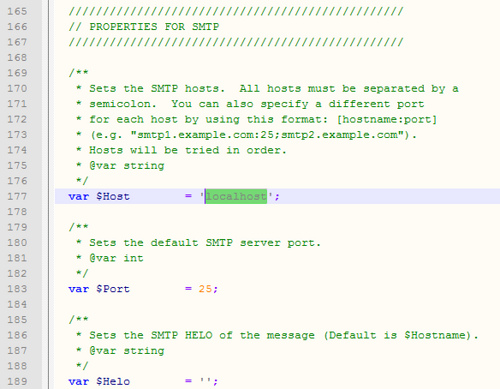
I used WinSCP over SSH to edit the files. When I posted comments again, the administration notifications arrived in my inbox.
14 comments
Comments from the original WordPress site, kept read-only.
Hi.
Thanks for this tutorial. I need help with it.
Could you be more specific as to what I have to change for WP notification to go through in class-phpmailer?
Also, my cforms plugins isn't working. The messages sent with the cforms don't go through.
You can see this form at blackberryrocks.com/contact.
Would you be able to help? Thanks!
I'm using WP 2.7.1 on a virtual dedicated server, just in case.
That
this worked perfectly! Now I get comments!
I tried this sugguest and it everything I added a post or added a new user I got a white screen. I had to revert back. I'm using 2.8.2 I'm not sure what else I can do to recieve emails when someone post a comment this was working before I updated. Any?
A WP plug-in exists that does this without having to hack php pages.
Try this:
http://wordpress.org/extend/plugins/wp-mail-smtp/
I've tried this, alas no success. I'm on WP 2.8.6, so who knows. I've tried various contact form plugins and such, and I give up. The easiest thing to do seems to create a "Contact" page and just stick in an email link like this:
E-mail Me!
Works just fine everytime, and all the rest of this stuff is way too confusing.
Facebook Şifre Alma Programı
Bilgisayara Girme Programı
i am happy to find it thanks for sharing it here. Nice work.
Thank you!
Awesome web site, I hadn't noticed www.networknet.nl before in my searches!
Keep up the wonderful work!
Thank you so much,
My sendmail program even through routed to smtp relay was querying dns server.
Unfortunately there is no DNS inside the DMZ.
Routing the php code directly to smtp relay worked well.
Now My only concern is, if i update the Wordpress with patch release, do i loose these changes ?
@Deepak keswani: Yes, you will lose the settings with a wordpess update, it happened to me too.
worked perfectly.
Allowed me to stop using a plug-in, which speeded up the site. dropped plug-in load time from 16.6% to 5.1% of time.
Thanks for the simple explanation, as it was hard to find where to make changes before finding this.