Ubuntu JeOS: Enable Apache2 mod_rewrite
 While building and testing an Ubuntu JeOS 8.04 virtual machine, I encountered a problem with mod_rewrite. I migrated one of my WordPress blogs to the new VM. The main page and administration area worked, but other pages returned “page could not be displayed”. After checking .htaccess and reconfiguring WordPress options, I found that rewriting was not working in Apache2.
These are the steps I used to configure the module in Ubuntu JeOS 8.04 and Apache2:
Shell1 line 1sudo a2enmod rewriteShell1 line 1sudo nano /etc/apache2/sites-enabled/000-default- Change AllowOverride None to AllowOverride All for <Directory /> and <Directory /var/www/>
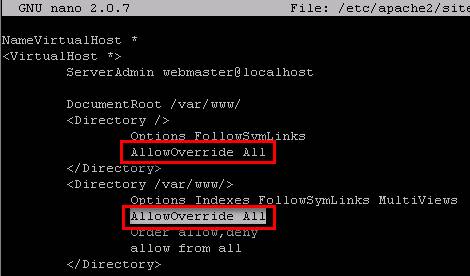
- Restart the Apache2 services:
Shell1 line 1sudo /etc/init.d/apache2 restart
That's it!