WordPress: A slow intranet site behind a firewall
I am a big fan of the WordPress blogging platform and recently introduced it in my enterprise environment. This WordPress installation runs on a restricted network with no internet connection.
While setting up the virtual machine to host WordPress, I encountered a problem: it was very slow. I had downloaded WordPress 2.7 and installed it on an Ubuntu JeOS 8.04 virtual appliance.
The initial configuration worked, but the administration area took minutes to respond, with each action taking more than 30 seconds. The virtual machine was behind an intranet firewall and could not connect to internet services. The following changes got WordPress working with pages loading in less than a second.
Disable internet requests from WordPress
- Go to ../wordpress/wp-includes and open http.php.
- Search for "function request( $url, $args = array() ) {".
- Add "return;" as shown in the example: "return;global $wp_version;".
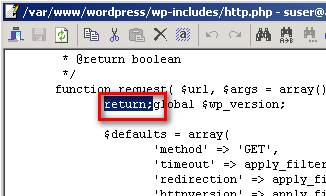
This disabled all internet interactions, which I did not need in this environment.
Reference
2 comments
Comments from the original WordPress site, kept read-only.
Nice one!!
Also working for me!
Keep up the good work!
I use this to tell their sites with wordpress 2.7x
Now how do I do this in Worpdress 3.0.1. There is this line function request ($url, $args = array ()...