Cisco: Reset a switch password while keeping its configuration
Have you ever needed to log in to a Cisco switch and change its configuration, only to find that you did not have the password? The person responsible may be on vacation or out of the office, or you may have forgotten it.
A few months ago, I had a failing network segment in a production area and needed to act quickly. I found a spare switch, but could not log in.
Reset the password and keep the configuration
The screenshots below show how I reset the password while keeping the VLAN and switch configuration. Power on the switch, connect a console cable and follow these steps: 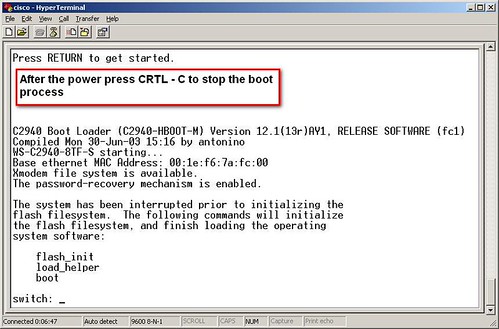
Press CRTL-C to stop the process. You are now at the "switch:" prompt.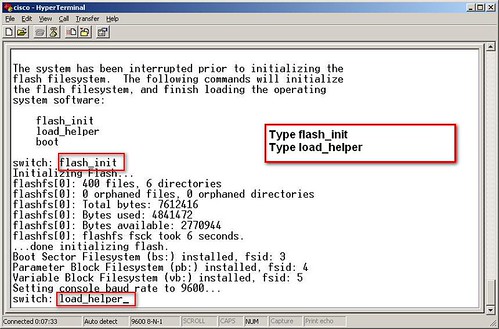
Type flash_init and press Enter. Type load_helper and press Enter to load the basic IOS. 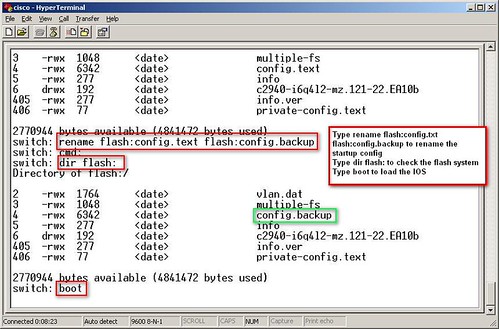
Type rename flash:config.text flash:config.backup to rename the current configuration file as a backup. Type boot to reload the switch.
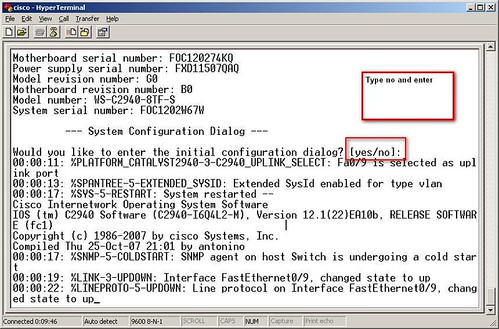
Choose no for the initial configuration.
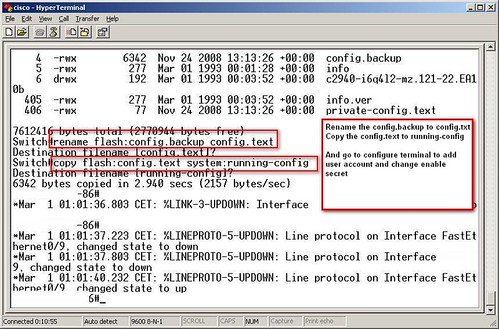
Run Rename flash:config.backup config.text and copy flash:config.text system:running-config. You can now add or change the usernames or enable secret. These steps got the spare switch up and running in 15 minutes.
4 comments
Comments from the original WordPress site, kept read-only.
Wonderful goods from you, man I’ve understand your stuff previous to and you are just too fantastic I really like what you have acquired here, certainly like what you are saying and the way in which you say it You make it enjoyable and you still care for to keep it sensible I can’t wait to read far more from you This is actually a wonderful website
Hi there! You are welcome.
Thanks for stopping by.
Hi thanks it work porperly.
I have cisco router 2950.tried to reset its password
But couldn't because load helper command is not working