SharePoint 2007: Office SharePoint Server Search service missing
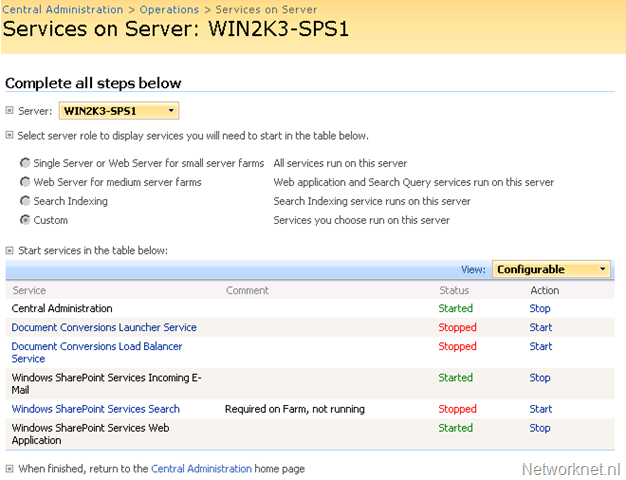
For the last couple of hours, I have been struggling to install an SSP provider for SharePoint 2007. Creating a new SSP provider requires an indexer, but the selection was empty. A Google search led me to the “Office SharePoint Server Search” service under “Central Administration > Operations > Services on Server”. I needed to enable the service, but it was missing.
Example screenshot:
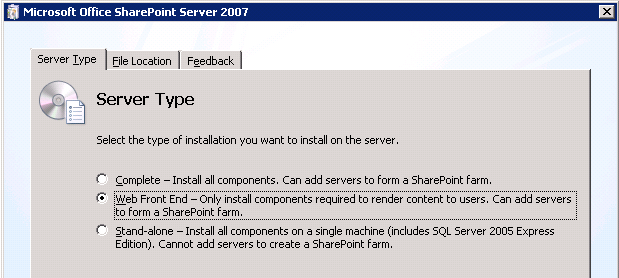
Then I found my mistake. During the SharePoint 2007 installation, I had selected the “Web Front End” server type instead of “Complete”.
I returned to my installation notes, and the screenshot confirmed that “Web Front End” had been selected.
Related links
- Installing a New Microsoft Office SharePoint Server 2007 Portal: Step-by-Step Instructions
- Deployment for 2007 Microsoft Office SharePoint Server
2 comments
Comments from the original WordPress site, kept read-only.
hi ivan,
I also chose web front end for some of my servers - do you know if it is possible to add the missing search components afterwards without reinstalling the whole sharepoint?
thx, mel
Hi Mel,
No that is not working. I tried that myself but reinstalling is the only solution.
Let me know if you found another solution for that. It has been a while ago I worked on this and my solution was to redo the installation. Quick and dirty but it worked.