VMware: First impressions of Workstation 7
VMware has updated its client virtualization platform with the release of VMware Workstation 7.
Features in Workstation 7
- Desktop virtualization support for Windows 7
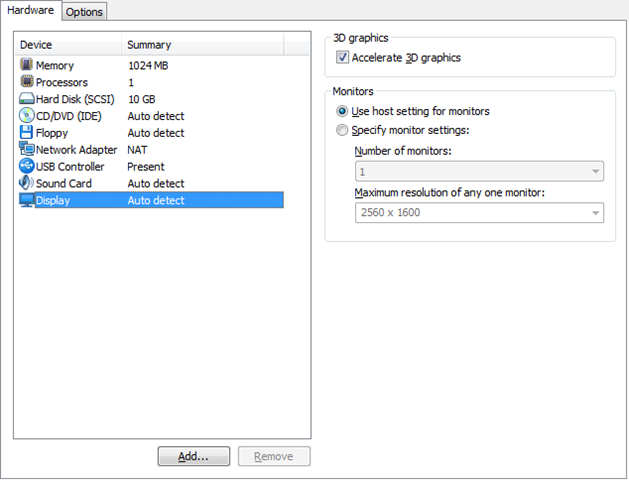
- Windows Aero support in Windows Vista and Windows 7 virtual machines
- Up to 4 virtual processors or 4 virtual cores and up to 32 GB of memory per virtual machine
- Support for installing and running VMware vSphere 4 and VMware ESXi in a virtual machine
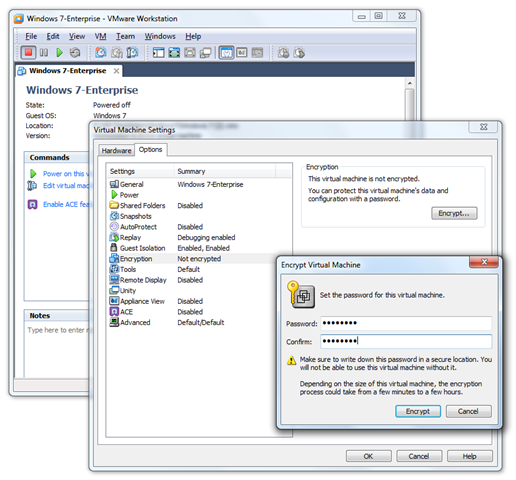
- 256-bit AES encryption
VMware’s overview
This video from the VMware site gives an overview.
I was impressed with this release. The VMware team did a great job.
The encryption feature
3D graphics
I plan to test the VMware 4 hypervisor installation soon.
Related posts
- VMware: Back up and migrate a small vCenter database
- VMware: Upgrade ESXi 4.0 to 4.1
- VMware: Install Windows 7 from USB media in Workstation
- VMware: VirtualCenter Server service fails to start
- VMware ESX: Set a static MAC address
Show 27 more posts
- VMware ESX: Blue screen during Windows XP installation
- Windows 7 Beta: First impressions and VMware Workstation
- VMware ESX: Hyper-V and memory overcommitment
- Dutch VMware User Group Event 2008
- VMware Workstation: High-speed USB 2.0 support for a VM
- VMware ESX: Extend a Windows Server 2008 basic volume
- VMware ESX: Extend a full virtual hard disk
- VMware ESX: Configure a Service Console IP address
- VMware ESX: SSH remote management
- VMware ESXi 3.5 is now free
- VMware Workstation 6.04: Unrecoverable error on Linux x64
- ESX: Create port groups and assign VLANs with esxcfg-vswitch
- VMware Premium Support and a Linux Live CD
- VMware Workstation 6.5 beta
- VMware VMDK: Failed to lock the file
- VMware Server: 511 vmware-serverd service is not running.
- VMware Converter 3.0.2 Update 1
- VMware ESX3i: identify Cisco switch ports with CDP
- VMware ESX3i: monitoring server health
- VMware Player: a CMD startup script
- CactiEZ 0.3: Install the appliance in VMware Workstation
- VMware Tools: Mouse tracking issue
- VMware: ESX Server in Workstation 6 screencast
- VMUG.nl: Verslag van het Dutch VMware Usergroup Event 2007
- VMware: Install ESX Server inside Workstation 6
- VMUG Event 2007: Nieuwegein, 7 December
- VMware Workstation 6: Team tutorials
1 comment
Comments from the original WordPress site, kept read-only.
Hi there, i read your blog occasionally and i own a similar one and i was just curious if you get a lot of spam remarks? If so how do you reduce it, any plugin or anything you can advise? I get so much lately it's driving me insane so any help is very much appreciated.