PowerShell: Delete a remote file using a list of computers
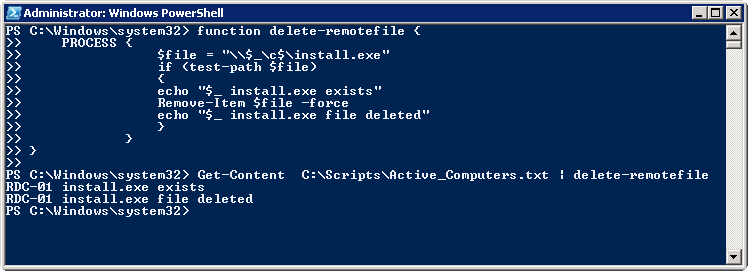
This PowerShell script deletes a remote file from computers listed in a text file. It defines a function for the session and pipes the computer names from the file to that function.
Create C:\Scripts\Active_Computers.txt and add the computer names.
| |
That's it.
12 comments
Comments from the original WordPress site, kept read-only.
Thanks!!! This worked out for me
Thanks Ram. How would you go about deleting specific file types. For example: I want to delete all .pst files from a list of computers.
How could I change this script to delete a list of files (list.txt)?
Can this be used to delete PST files, if so on what OS XP and Windows 7
Hii
I would like to know if the aboe script would work for computers which are password protected because I have around 400 machines in the domain and I wanted to delete some log file and txt file from all the computers
Thanks
Amit
Id doesn't work for me.
I have a folder named: C:\scripts\master2
it has inside
clean2.ps1
computers.txt
I run the script on the same computer and i get:
PS C:\scripts\master2> .\clean2.ps1
Get-Content : Cannot find path 'C:\scripts\master2\computers.txt' because it does not exist.
At C:\scripts\master2\clean2.ps1:13 char:12
+ Get-Content <<<
any advice?
Great script. Thanks. You just saved me a few hours of my life.
New to powershell - Thanks! This saved me a lot of time. Appreciate it!
Brilliant!
This worked great. I medified it to use wildcard for logs and it saves so much time.
Thanks!
This worked great. I modified it to use wildcard for logs and it saves so much time.
I will call if from my stop script tp dp the cleanup once systems are stopped.
Thanks!
Thank you sir!
Could i take it one step further and ask how can we delete temp files for all users on any given machine that are active for last 60 days ?
Please and Thank you!