Windows XP: Change the default keyboard layout at logon
I created a virtual machine in a German organizational unit (OU) in Active Directory. The OU has specific location and keyboard-layout settings. I want to change the default logon keyboard from German to English. My keyboard uses the English QWERTY layout; the German layout uses QWERTZ and different characters.
German keyboard layout at logon
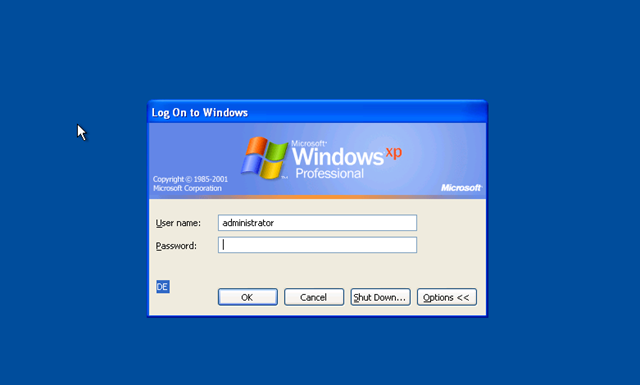
Change the default layout
Log in as Administrator, open RegEdit.exe and browse to:
| |
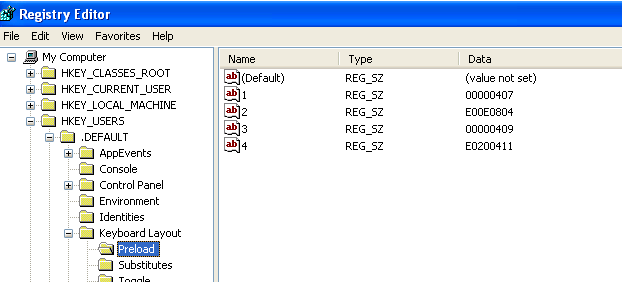
Change the REG_SZ value named 1 to the keyboard layout you need. I wanted English (EN) as the default instead of German (DE).
- "1"="00000407" ==> English
- "2"="00000409" ==> German
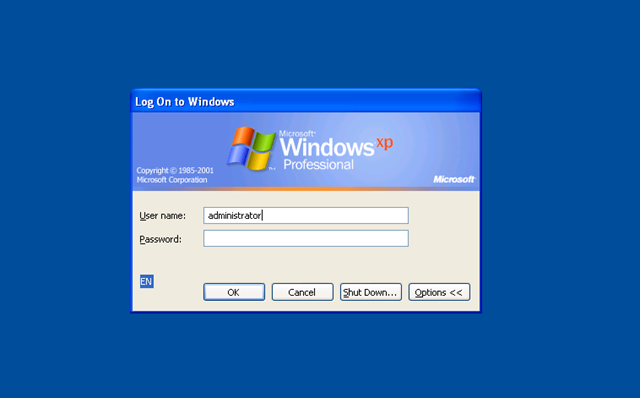
After changing the Preload setting, I logged off and saw the new English keyboard layout.
2 comments
Comments from the original WordPress site, kept read-only.
Along with everything which appears to be developing within this subject
matter, many of your opinions are relatively stimulating.
Having said that, I am sorry, because I can not give credence to your entire plan, all
be it stimulating none the less. It appears to everybody that your opinions are generally not entirely
justified and in actuality you are generally your self not really entirely confident of
your point. In any case I did enjoy reading through it.
It is not my first time to pay a quick visit this site, i am visiting this
site dailly and obtain fastidious data from here all the time.