App-V: Hide the Q: drive in Windows Explorer
The Microsoft App-V client publishes virtual applications to users. It stores application packages in a local cache file called sftfs.fsd. On Windows 7, this file is in C:\ProgramData\Microsoft\Application Virtualization Client\SoftGrid Client. During sequencing, a special drive is used as the destination for the installation files. The default drive is Q:\.
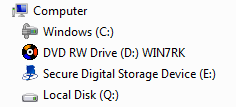
Installing the App-V client on a computer also mounts the Q:\ drive and displays it in Windows Explorer. You can choose a different drive letter during installation, but that drive will still appear in Explorer.
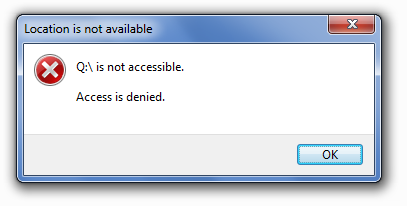
Neither a regular user nor an administrator can open Q:\ directly in Windows Explorer. Both receive an access denied message.
After starting a published application, you can access its package directory and view its contents. Other package folders remain inaccessible unless they are linked through DSC (Dynamic Suite Composition).
Hide the App-V client drive
You can create the required DWORD values with VBScript, a registry file or GPO Preferences. I found that a regular Windows 7 user could not add them. As an administrator, locate the user’s SID under HKEY_USERS and add the values there.
| |
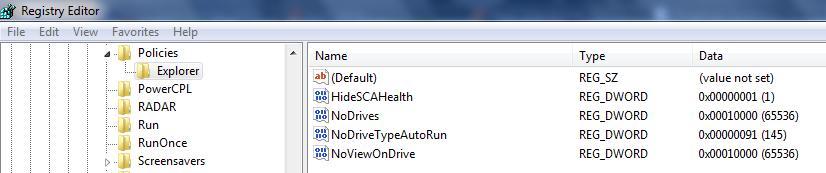
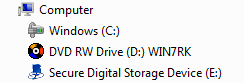
After restarting Explorer.exe or the computer, the Q:\ drive is hidden from the Windows Explorer list. For enterprise deployment, add the REG file through a user configuration GPO preference.
The result:
References
- How to hide and to restrict access to the App-V (SoftGrid) client drive letter
- Hide Drives from Your Computer in Windows 7 or Vista
3 comments
Comments from the original WordPress site, kept read-only.
what is App-v ? why does it used with widnows 7?
Hi knev,
App-V = Microsoft Application Virtualization (MS App-V) platform allows applications to be deployed in real-time to any client from a virtual application server. It removes the need for local installation of the applications.
If you are migrating to Windows 7 and you have Microsoft Software Assurance then you can purchase MDOP (Microsoft Desktop Optimization Pack). App-V is part of that. I have been very succesful with this application virtualization infrastructure and virtualized over 100 packages in the last year.
Please check out my App-V article here( https://networknet.nl/apps/wp/app-v).
Great solution! Working fine!
Thank you!