Windows 7: Remote Desktop licensing protocol error
Windows 7 runs Remote Desktop Protocol version 7 (RDP 7). Since moving to Windows 7, we have encountered the following problem:
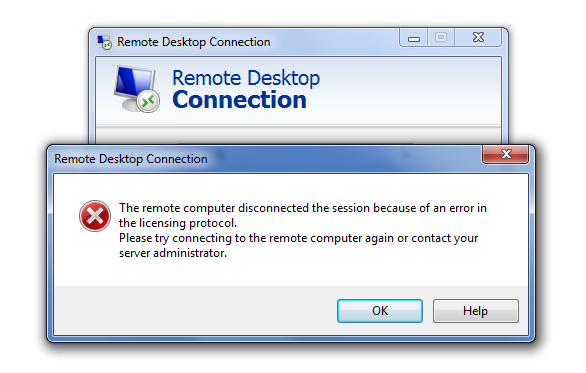
There was little useful information online about this error, and a client was reinstalled in an attempt to resolve it. Eventually, a simpler solution restored remote connections. The problem was on the client, not the Remote Desktop or terminal server.
Run Remote Desktop Connection as administrator
Right-click the Remote Desktop Connection shortcut in the Start menu and select Run As Administrator once. Log on as Administrator and connect to the remote system.
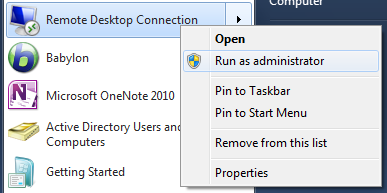
Reboot the client. The RDP connection will then work for a regular user as well.
Reference
18 comments
Comments from the original WordPress site, kept read-only.
Ivan,
Thanks for this! I spent too much time on this and to find out such a simple solution.
Thanks again for the writeup!
Tony
Work for me to thanks
Worked man. Thanks for the info
thanks man god bless you.......
Still having issue while log in via administrator
Thank you so much
It works,
thank you very much!
You're awesome, Simple solution for a problem that i thought was complex.
tHANKS...........................
Its Works
Simple step,but worked perfectly..
thanks
This saved me..
thank you so much from helping me i was thing to formate the PC .
thankyou so much one again , from save my time. this was realy simple method ...
Thanks this worked
THANK YOU!!!!!!!
Finally, a solution to this crap! :D
<p>
thanks bro it worked god bless you
</p>
Thank somuch
thnx mliard time !!