PowerShell: Hyper-V switch uses the public network profile
While troubleshooting communication between a backup agent and server, I found this configuration on my Windows Server 2012 R2 Hyper-V host:
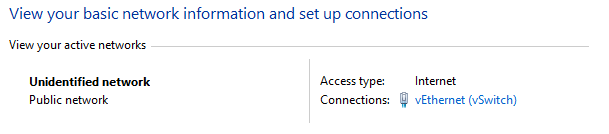
The virtual network adapter for the Hyper-V switch and ManagementOS was classified as "Public network"/"Unidentified network". I wanted the domain profile because several Windows Firewall rules only allowed inbound communication from the internal domain network.
Inspect the network profile
From an elevated PowerShell prompt, I checked the current profile:
| |
It showed NetworkCategory:Public. I tried to change it to Domain:
| |
| |
Restart Network Location Awareness
I could not change the category directly, so I opened services.msc and restarted the "Network Location Awareness" service. That resolved the problem.
The issue probably started when I created the Hyper-V virtual switch. A reboot might also have resolved it. The following command restarts the NLA service so it can find the domain controller and set the network profile:
| |
4 comments
Comments from the original WordPress site, kept read-only.
Cool~
My comments are fixed again after 13 month corrupted wp_comments table in my Wordpress Mysql database
Cool Ivan!!
This solution work until first reboot, after reboot network is again as Public, help!
I wrote a small script to check at boot and restart NlaSvc if nescessary:
do
{
$NicCat = (Get-NetConnectionProfile -InterfaceIndex 7).NetworkCategory
If ($NicCat -ne 'DomainAuthenticated'){
" Network adapter not yet DomainAuthenticated, restarting NlaSvc." | Out-file $LogFile -Append
Restart-Service NlaSvc -Force
Start-Sleep -Seconds 300
}
} While ($NicCat -ne 'DomainAuthenticated')
" Network adapter set to DomainAuthenticated, exiting" | Out-file $LogFile -Append