VMware Converter 3.0.2 Update 1
The latest version of VMware Converter has been available since 3 December last year. During yesterday's P2V migration, it helped me decide how to proceed. The scheduled migration was taking a long time, so I decided to use my evaluation CD of Acronis True Image Server. After six and a half hours, I had copied less than 20 GB from the physical server with VMware Converter.

New features in v3.0.2 Update 1
Conversion of VMware hardware version 6 products: Workstation 6.x, VMware ACE 2.x, VMware Fusion 1.x, and VMware Player 2.x
Conversion of an additional third-party disk image format: Acronis True Image 9
Experimental support for Microsoft Vista 32-bit and 64-bit operating systems
Ability to set speed and duplex settings on the network adapter while performing cold cloning migrations, by using the VMware Converter Enterprise Boot CD
Support for Symantec Backup Exec System Recovery 7.0
I was excited to see support for importing TIB backups directly into VMware Converter. I rebooted the server, connected the USB disk and backed up the two partitions I wanted to convert into a VMware image. The whole process took less than one hour.
One large TIB file was created. I then went to my host machine with VMware Converter and restarted the import, but it ended with this error: "VMWare Converter Import Wizard - Unable to load the source virtual machine or image. The file may be corrupt, or of an unsupported format".
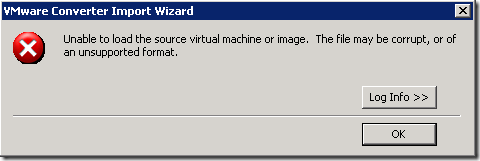
I found the following messages in the log file:
[#4] [ 'App' 124 error] [tibvolumeimagedriver,316] Error while mounting image
[#4] [ 'App' 124 error] [v2iDiskWin32,198] THIRDPARTY_LIB
[#4] [ 'App' 124 error] [v2iImportSource,168] Import source not recognized
['P2V' 3752 error] [task,295] Task failed: P2VError IMPORT_SOURCE_NOT_RECOGNIZED()
['P2V' 3752 verbose] [task,339] Transition from InProgress to Failure requested
I am sure the TIB archive was fine; I had also verified the backup. I have seen these errors before when importing Virtual PC or Virtual Server virtual machines. I will try to find out why the TIB volume driver fails to load in VMware Converter.
Converting the backup with Acronis
Acronis True Image Server successfully converted the TIB backup into a VMware image. The server is at least up and running for testing.
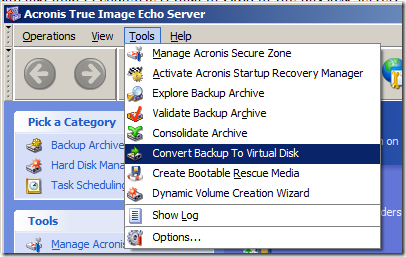
The screenshot shows Acronis True Image Echo Server and its Convert Backup to Virtual Disk option. This option only converts the backup for the selected virtualization product. For VMware Workstation, first create a virtual machine, then use the converted virtual disks as existing disks.
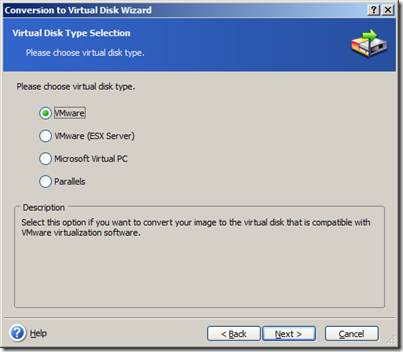
It supports VMware, VMware ESX, Microsoft Virtual PC and Parallels. I have completed a couple of successful P2V migrations with Acronis and will continue testing it. I will post further updates here.
2 comments
Comments from the original WordPress site, kept read-only.
Hi,
Did you get a fix for the above error when converting *.tib image file using vmware converter.
Same problem here, i will try to convert backup to vm using True image echo server.