VMware VMDK: Failed to lock the file
I copied a Windows XP virtual machine from a VMware Server 1.02 system to my local workstation. After the files were copied, I opened the vmx file in VMware Workstation 6 and received the following error when I tried to start the virtual machine. It had one snapshot on the VMware Server.
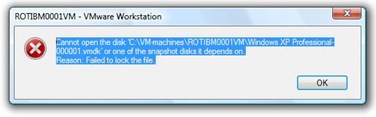
Remove the lock folders
Locate the virtual machine in Windows Explorer and delete any .lck folders.

Start the virtual machine. If it fails to boot, try mapping the virtual hard disk to Z:\, for example.
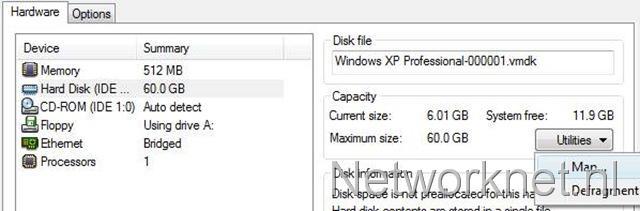
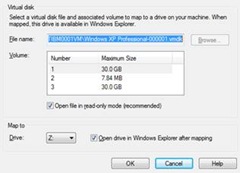
I then disconnected the virtual hard disk and tried again. The virtual machine booted without any problems, and my snapshot was still valid. Deleting the .lck folder saved me a lot of work.
294 comments
Comments from the original WordPress site, kept read-only.
Thanks! Worked for me.
--BT
I virtualized a fisical machine but when i tried to open on workstation i got the same error: failed to lock the file. So i removed the 2 folders .lck but when starting again the machine i get this error: Cannot connect virtual device ide1:1. No corresponding device is available on the host.
It tries to open but as soon as windows screen appears i get a blu screen! i tried to map the drive to z as you suggested but i get the same error.
Can you helpme please. thanks
Thank you for your post, it worked great! thanks for sharing the knowledge!
Works! Great Tip
Wow i did it. Great thanks.
Worked for me as well!
thanx
Thanks so much for sharing this with us. :)
Yep ty, worked 4 me.
tks a lot
Very very thanks!
I had a similar problem after a power outage. In /var/lib/vmware/Virtual Machines/ there are 2 folders which end in .lck. Deleting both of these solved my problem
Thanks worked for me as well and I was running Ubuntu on VM not windows!
Worked. Thanks.
Worked. Thanks.
Thanks... it worked
You are the best
Grasia fiera, me rre sirbio
Renaming the .lck files (safer than deleting until I verified it would work ) worked perfectly for me. I am running VMware Server 2 under an Ubuntu Server v-8.04 64 bit platform, Dell Precision T3400 8Gb RAM machine.
I had been running several VMware Workstation machines under XP Pro with VMware Workstation v-6.5 with a Dell Vostro 220 4Gb RAM machine, and wanted to migrate the virtual machines to the VMWare Server 2 for better load balancing, and on a higher RAM machine for greater concurrent virtual machine density. Imagine my surprise when the first imported machine worked great. The others did not, until I renamed the .lck files. Your post saved me hours of setting up new virtual machines.
Thank You!
Gil
Wow, thanks a lot, u saved so much of my time :D
Thanks a million that worked :)
ho lo stesso problema ho fatto le seguenti prove:
ho la vmware server con windows 2003 server su server linux red hat 5 enterprise edition
1: cliccando su start mi dà l'errore:
Unable to Power On virtual machine with “A General System error occurred: Internal error”
2: ps -eaf|grep vmware
root 26375 19955
Message from hyperion.sin.it: Cannot open the disk '/u03/VMachine/W2k3PLA/W2k3PLA.vmdk' or one of the snapshot disks it depends on. Reason: Failed to lock the file.
qual'è il pid è 26375 o 19955
3: devo fare kill 26375 o kill 19955
e riavviare la virtual machine?
aspetto una mail di risposta.
grazie cordiali saluti
dott. ugo montorsi
Thanks a million... worked for me and saved my VM!
Cheers, Works Like A Beauty
thanks
gracias fiera me sirvio mucho ya lo daba por muerto mi maquina virtual
Thanks dude. It worked.........
Awesome. You are my hero.
Excellent!!!!! It works for us, thankyou very much!
Thanks it worked great for me
Thanks. It worked for me aswell!
Great, worked perfectly! Cheers!
Nice! It worked!
Just wanted to add my name to the long list of people who solved their problem from this tip. Thanks.
thanks... worked for me too. good job.
Thanks a bunch!!....You saved so much of my time!
Thanks!!
thanks a lot ... it really saved a lot of time .it was great help .
thanks it worked
Thanks, great information, solved my issue :-)
muy bien, muchas gracias. Thanks.
dzieki wszytko dział!
thx everty thing work
I'd just like to add my thanks too! I had my heart in my mouth when I thought I'd possible lost yesterdays development work but everything is running again. Thanks!
Thanks a lot. It is grate solution.
When i upgrade from VMServer 1.8 to VMWare Server 2.0, I can't open my os. I am confuse what i can do, after that i try to find the solution. From this site i get solution. Just i delete the two lock the from vm directory as per recommendation. Thanks a lot.
Excelente!!!
I ran into the same problem when I moved from VMWare server to VMWare Workstation. Your solution worked for me too. Thanks for sharing!
The error occurs most of the times because VMware finds a lock directory in the same directory as the VHD.
The simple solution is to remove this directory (you'll recognize it by the extension '.lck')
The error is most likely caused by a wrong shutdown of VMware (either it crashed, or your PC crashed, or you just broke it. whatever applies :P )
Happy virtualizing~
Exactly what I needed. Thanks a ton :)
Excellent! That is all i need to know! Worked great.
Thanks! ;)
Perfect. Thanks for sharing.
thanks....it worked
Thank u so much it worked !!!!
thanks
I am not a vmware techie and know enough to be dangerous...have the lock file situation and understand the fix but do no know how to get to the folders\files on the vm to delete them. Any help greatly appreciated.
Thanks, saved my bacon. Otherwise I would have to rebuild the vm's.
Thanks...!! it works..but I could not understand why it was happened ?
thanks a lot you saved my filelife :D
Thanks a lot pal! That worked brilliant
Funcionó! Gracias!
It worked! Thanks!
Excellent!!!! .... Thanks a lot!!!!!!!!!!!!!!!!!!!!!!!!!!!!!!1
Thanks :) I thought I lost all of my TV shows. You're a life saver.
thanks for your help my server is working now.
if it doesn't work rename the disk
okay it's work. with only remove .lck folder. thanks brother
Thank u so much it worked !!!!
Thank a ton It worked.
Thanks, that saved my ass ;) thank you very much! Brilliant!
Thanks from Russia :)
Thank you very much. I have just deleted the .lck folders and I could power on my Virtual Machine. Do you know why this situation could happened?
Thank you very well written guide solved the problem in seconds (my computer had crashed whilst the VM was running).
Saved my day! Thanks
YEAH!!! Work fine!!! Thanks
I have deleted the .lck folder and now it still would not work it shows another error (Cannot open the disk '..-..') Reason: The specified virtual disk needs repair. and when i restore those folders back it shows me the first error message ( Failed to lock the file.)
and it doesn't let me to change the drive Letter i believe due to the error
thanks
it worked. thanks.
It solved my problem.
Thank you!
Nice, worked just as normal. Thanks
Worked. Thanks.
thanks a lot
Thank you so much , It worked for me.
Thanks your a life saver.
THANX!!!
I'm a newbie in VMware but that think worked smooth !
I'd like to thnk you lot, my server it work now.
So good
thanks solve my problem
valew véio
Thanks. It worked for me! ;)
What happened was that my PC was abruptly shut down because of a power surge, so the VMware didn't have time to unlock the file.
And by deleting those files, the VMware will automatically create new ones to supress the old deleted ones.
Everything should be OK like old files and configurations you had prior to the incident.
Thank you very much! I works :)
* it works
:)
Saved my days. Thanks a lot.
thanks a lot
Thanks it works...
very helpful
tks.
Thhank you very much,
I hardly uninstall vmware workstation!~
it works dude as said,
thanks a lot
it worked! thx a lot!
Tahnk you So much Awasome!!!!!!
Thanks, thanks, thanks very much; I cloned my 120gb drive to 250 on SUSE and after, i thought i lost my CCNA stuff, I followed you recommendation and i am back in business, thanks again.
Thanks a lot.. it worked
Thanks a bunch!! Saved me hours of work.
This rocks man!
Saved my ass, thanks!
WOW This saved me from recreating the vm i thought i had lost.. thanks a bunch!! :D, although i have to ask.. what are the folders with the .lck for anyways? and is there any effect in the long run if they are removed?
hey thanks a lot. i salvaged the vm image from a bad raid 0 array and i thought its a gonner
Worked for me after a BSOD. Thank you
So thanks
Thanks a lot.. :)
Thanks a lot..
Saved my work ! Thank you !
Instruction can be improved a little better. Thank you !
Sir !
it is good idea my machine is working nice.
Thanks s lots ............!
Thanks buddy... It really worked out without any problem. Saved a lot of work, don't have to re-do the whole stuff of doing the re-installation of VM.
Many many thanks.
Thank you for that tip !
I was dealing with this problem for hours !
Thx !
Thanks a lot. It saved me from a big trouble :-)
Thank you very much !!!
Your solution solved my problem with my virtual machice..
Many thanks for the author of this article !!!
Thanks for this time saving article !
Thanks a lot, I could solve my problem without my husbands help! He will be very proud of me!
Thanks a ton, much appreciated.
it is work!!!!!!! Thanks a lot!!!!!!!!!!!!!!!
grazie mille!!!!!!!!
Thank you! i was stuck all day not being able to get into my work VM!
Oh SURE!!! Excellent! Tku
Nice worked greate thanks you saved me hours
friend
Thank you, I was desperate. Your tip saved my job.
Hi Emilio,
You are welcome.
Saved my day! Thnx.
Thank you so much, It works for me.
GREAT! thnks a lot!! : )
Oh man, saved my whole nerves and life! Thanks!
Thank you! Thank you! Thank you! Huge relief.
Hi Rap,
You are welcome. I am happy I could help you out here. Take care!
My physical machine was unresponsive and I had to reset it. After that when I tried opening the Virtual Machine I was receiving the same error, but just deleting the *.ick folders solved the problem thanks a lot.
Thanks a lot. You have saved my project!!!
Thanks! saved my ass too ;)
Brilliant, thank you
Thanks! That is a tip that is worth it's weight in gold your a champ in my book!
Thank u!!!! Is working great now!!!! You saved my weekend! I was desperate when i saw that mensage.
Simply Great...
Thanks a ton !!! Deleted .lck folder, works fine now.
Thanks Boss.
Thanks Friend , easy and simple to implement
Thanks man, I was worried lol
Gracias! Thanks for you're help, I Almost cried for this vm
:Thanks for your help.Tuttuğun altın olsun adamım
That it is actually a nice beneficial bit of info. I'm glad that you shared this valuable information along with us. You should keep informed similar to this. Thanks for sharing.
Thanks Alot bro
u saved me. It was scary.
thanks a lot for sharing with such a solution with easy to understand.
THANK YOU SO MUCH YOU SAVED ME ATLEAST 5+ hours of work!
Tks a bunch... this saved a lot of time...
Thanks a lot bro!
Thanks a lot that saved me a lot of time and also i thought i had to re create a virtual machine .
Thank u
thanks a lot hero
Thanks ! saved me a lot of time!
Thanks saved me
Thanks man that help me alot
tank youuuuuuuuuuuuuu man !!!! that help me alooooooooooooot tannk uuuuuuuuuu
Thank you you really saved me, I brought my work home when I finished and brought back to work I got this message I had no idea what it was. when I saw your site wow thank you I was really worried that I had to start my work again. Thank you again
Thank you. I didn't want to go back to a really old snapshot.
Thanks Man, it worked
Thanks a lot! Many many thanks!
Yes, thanks a lot... Really bad when something like this happens when you´re in a hurry right before a presentation...
If you have a 2nd partition (HDD) on your VW you might also have a .lck file loccated there. In this instance you will need to delete the .lck file in both locations
WHOOOWW... You just saved me 2 days of work for a demo due tomorrow!!!
Thank you so so much. It fixed my problem
Thanks ...................................................
Awesome JOB ! Saved me a lot of time.
How did you find this out ?
tooo good
Great! Thanks a lot - your post saved me a lot of time!
tnx a lot , Saved me a lot of time.
tanx a million!!!!!!
i was relieved when i saw my windows xp open again;)
you rock! thanks
Thanks... :)
Thanks a Lot!!!!
You Sir are awesome! Thank you so much!
You´re the man!..Thanks a lot!!
Thanks you! You saved me ;)
That worked! Thanks!!!!
Thanks. this worked.
Very very Thanks Master, Its work ... !!!!!!!!!!!!!!!!!!!!!!
Really Greaaaaaaaaaaaaaat thanks ...... you Saved me
Gracias me salvaste el puesto.
its really good...thanks a lot for help
it,s works very well
Thank you very much
ITS working fine thanq Very Much
worked like a charm. amazing
really cool! thanks!
Thank you for the tip! It was extremely helpful!
=D gracias!!! funciona perfectamente
thx for the info!
Thanks Man.......!!
Thanks ...wow it saved ma whole lot of assignments....
Thanks u LOTS !!!!!!!!!!!!!!!!!!!!!!!!!!!!!
thanks it helpd me a lot
Thanks
Thanks
After studying a couple of of the weblog posts on your website now, and I actually like your approach of blogging. I bookmarked it to my bookmark web site record and will be checking back soon. Pls try my website online as properly and let me know what you think.
txs a lot, now its working smooth.
This saved me from having to redo alot of projects I had for my Server classes!! Thanks so much!!
Thanks you very much. It save me a lot of time :)
thank you soo much.. :) such a relief
Thanks a lot. It worked for me very well :)
Thanks, That was awesome!!!
Thanks a lot! indeed, a great help....:)
Thank you man
thanks a lot man, you're god awesome advice
thankxxxx this really helped me out xxx
ly
thankxxxx a lot you save a life
Thanks a bunch! Was afraid I had to rewrite a whole lot of code
you save my life. thank you
Thanks for your guide. It helps me a lot.
I worked.. Thanks a lot...
Awesome!
thanx saved my life.
Directly to the point!!
Saved me a lot of time !
When I originally commented I clicked the -Notify me when new comments are added- checkbox and now every time a comment is added I get four emails with the same comment. Is there any approach you'll be able to take away me from that service? Thanks!
Thanks so much! It work like a charm!!!
Worked very fine thanks.
Thanks alot man you save my school. My students also thank you for the advice.
fantastic article, save my day
Great.. It works fine. Thank you
Rarely do I encounter a blog that’s both educated and entertaining, and let me tell you, you might have hit the nail on the head. Your idea is excellent; the difficulty is something that not enough individuals are speaking intelligently about. I am very joyful that I stumbled across this in my search for something relating to this.
Thanks, saved me a lot of time trying to figure it out
Thank you!
Thanks it worked for me too
great !! Thanks :)
Thanks man. It's worked for me.
Very Cool ! Thanks a thousand time !
Thanks a lot .. This happened to one of my very important VMs .. I really appreciate it !!
Thank you!
Thanks a lot. Worked fine for me!
Thanks man, u save my work...
Brasil.
thank you
Thank you, it helped me!!
Thank you !!!
Thank you !
Thank you, it helped me!!
Brasil
thanks, it's work for me
Thanks A Lot!!!
Occam's Razor stikes again. Good catch!
Merci beaucoup !!!
Thank you so much! It saved me
Tnx man ! U help me a lot !
You, sir are a life saver!!!!
Thanks a lot man.
It works like magic! Thanks Sir!
Thanks dude, it worked on debian 6 just by deleting the .lck folders. Oh yeah!
Thanx a lot !
Thanks Brother
Thanks a looooooooooooooooooooooooooooooooooooooooooooooooot :D
thanks a lot man, you’re god awesome advice
Thanks a lot, This helped me..
thanx man.it saved me a lot of work...
its worked, but wt the reason of dis error, and after deleted , how it works????
Thanks!
thank for U BOss
IT works with me
last thanks
Thanks a lot mate, you saved my day.
works for me as well....thx a lot!! :)
Hurrah, that's what I was seeking for, what a information! present here at this webpage, thanks admin of this web page.
Thanks!
Thanks a ton..!!!!!!!
Thank you very much!
Helped a lot!
Thanks for helping me... this works 100% and solved my problem
thank u so much..
Thanks, خدا امواتتو بیامورزه!!!
Thank you a lot. You saved my time.
Thanks. You saved my vm i need for college. Appreciate the share : )
Thanks a lot. Perfect solution.
tnx man ^^ small and perfect solution ^^
Gymnast Li Ning, founded by the same name sports shoes and apparel manufacturing regailer headquartered in Beijing,
in 2002 to 2009, revenues increased by 9 times eaarnings
per share increased 10-fold. POU MONEY HACK A detailed
look at their work will help you iin getting what you're looking
for. Since 1970 Multi-Pure International has been an industry leader.
Thanks..It worked for me!!
it work's thanks!
This post will help the internet viewers for building up new blog or even a blog from start to end.
Wow, superb blog layout! How long have you been blogging for?
you made blogging look easy. The overall look of your web
site is magnificent, let alone the content!
me sirvio!!!!!!! es neta solo borren todas las carpetas q dicen .lck y listo
Thanks.....
Thank you, it worked for me :)
works great.
Works perfectly for a Windows 7 VM on Ubuntu 14.04
The problem was, she expects the man to do all of the
chivalrous things” like paying for every thing.
However nonetheless, knowing what I do know now, if I needed to do it over again,
I would still get into a relationship with her. My level is, awesome intercourse is something that
one can offer to a relationship, so why maintain it
again. Moxie raises a great level, notably if the man has
some dating experience. Few males are going to leap via hoops for a girl they simply met, especially if it was on-line, except
they are getting one thing bodily in return.
Thank you so much!
Thanks it works for me too
So where ever you see this news you will get the most up-to-date
news as you also will be able to start to see the track of your
state and other details if you need to see. Peneff's office with 2 minutes to spare, and hearing him compliment me for my true grit and street smarts with
1 minute to spare..
Good oldie, still works in 2016!! thanks!
Thank you...
It works. Help me to solve it true emergency.
thank you very much
Thanks alot, you saved my time ;)
Thanks
Thx a lot! Helped me! Running Win 8.1
Thanks for help… this works 100% and solved my problem
thank you . it works great
You are welcome!
Thanks bro for this tip
Worked for me as well, though I had a hard time locating the lock files while my VM was in suspended state. This tip about the failed vmware lock file and suspended state helped me fix it :-)
Thanks for posting!
Its works..
Thanks
Worked, thanks :)
Excellent !! It worked by deleting .lck folders