Choosing a desktop virtualization product
The overview below summarizes some supported features of my favorite desktop virtualization products. I hope it helps you decide which ones to evaluate. Microsoft Virtual PC 2007 is free, but VMware Workstation and Parallels Workstation include features it lacks. A Parallels Workstation license costs $50, and VMware Workstation costs $190, so the choice depends on your requirements. For more details, see the desktop virtualization page.
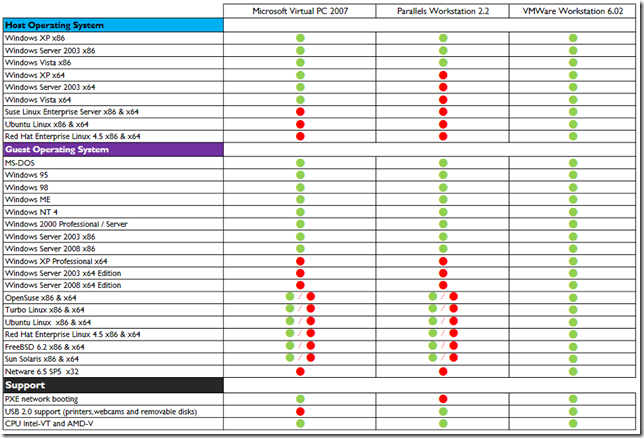
Why I would choose VMware Workstation
- Support for x64 virtual machines. This lets me install and test the 64-bit version of Exchange Server 2007. I have been running Exchange Server 2007 for 6 months in a virtual machine with 2 GB of RAM, and it works great.
- Support for running ESX Server in a virtual machine. I have been testing ESX Server in VMware Workstation for a while, which has helped me become familiar with ESX Server and its components. ESX3i and ESX3.5 can be installed in a VMware Workstation virtual machine, but their virtual machines cannot be powered on.
Update: 2008/11/06 — VMware Workstation 6.5 supports installing VMware ESX3.5i and ESX 3.5 and starting their virtual machines.
- USB 2.0 support. I redirected a dozen USB devices to my virtual machines for testing. One example was a USB ADSL modem with no Windows Vista drivers available. I booted my Windows XP virtual machine, redirected the modem to it and installed the drivers. I could then browse the internet. I also redirected my fingerprint reader and tested its software on Windows Vista and Windows XP virtual machines.
- Teams of virtual machines. This is a neat feature when building a test lab with different kinds of virtual machines: domain controller, DNS, ISA and Exchange.