Cisco PIX 501: port forwarding to a Windows PPTP VPN server
In this example, I configure port forwarding to a Windows Server 2003 PPTP VPN server. My lab is configured as shown in the diagram. I have a /28 network registered on the internet, with 14 public IP addresses available through the ISP uplink. The SDSL modem provides these addresses through its internal DHCP server. For the Cisco PIX 501 firewall, I use a manually assigned public IP address.
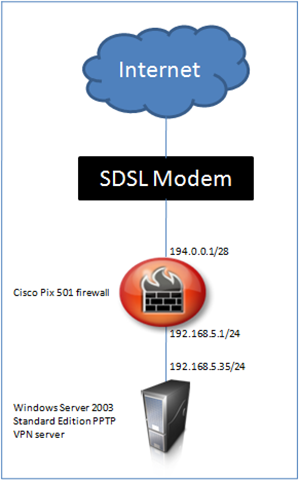
Configure PPTP port forwarding on the Cisco PIX 501
The CLI commands below configure static NAT to a public IP address for TCP port 1723 (PPTP). I also use access-list entries to allow TCP and GRE traffic to the VPN server.
| |
The result
After applying this configuration, I could connect from my Windows XP and Windows Vista computers using the built-in VPN client and PPTP. I configured static port forwarding on TCP port 1723 and enabled the GRE IP protocol fix with the "fixup protocol pptp 1723" command.
Without the PPTP fixup, I have to translate the complete internal host (VPN-02), using all TCP ports. If you do not apply the fixup, you will probably receive an event log message like the one below.
| |
5 comments
Comments from the original WordPress site, kept read-only.
I've an cisco px 501 (PIX Version 6.3(3)), using the cisco vpn client and works fine from win XP, but the new laptop comes with Vista Business and here cisco vpn client doesn't work.
Do you know if Vista need some change in config or so on,
Thanks in advance.
Guillermo.
Hi Guillermo, which version of Cisco VPN client did you install? I had problems before and you should install Cisco VPN Client v5 for Vista.
What kind of error message do you get if any?
Send me an email at ivan1980(at)networknet.nl.
Thank, the “fixup protocol pptp 1723″ command fixed all my problems
Dear Sir
I have 2 x Cisco Pix 501 with ver 6.3 (5) router, I want to setup Site-to-Site VPN for linkup both internal network. I had found some example configuration from web but still failure.
Could you help me ?
The detail is as follows:
Site 1 have 192.168.6.x have true IP 203.186.x.x with Win2003 server (192.168.6.88)
Site 2 have 192.168.123.x have true IP 223.255.x.x (user need to access the windows server at Site1)
Also, could you tell me why some PC can't open the PDM but server can ? It due to IE security or Java version ?
Thanks a million
Po
Great content! I’m all for this. The article is generally helpful for me. Reading your article tends to make me satisfied. At one time, I will be able to learn far more knowledge. Thanks quite definitely.