Windows Vista: Problem Reports and Solutions
This morning, the Problem Reports and Solutions window appeared on my screen.
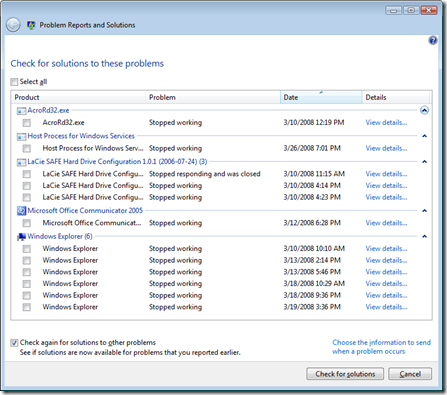
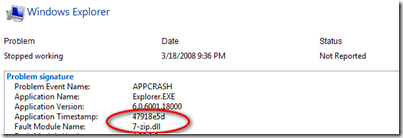
I like many of Vista's new features, especially this one when troubleshooting client issues. For example, I run the 7u program in an SVS layer, and Windows Explorer stopped working a couple of times, as shown in the report above. I traced those events in Event Viewer and found 7-zip.dll.
Do not forget to check the Reliability and Performance Monitor occasionally. It helps you trace past problems, especially when users report error messages. The graph shows when the Vista client's reliability is declining. My Vista client has an index of 4.81, which I consider acceptable for the time being.
Based on data collected over the lifetime of the system, each date in the System Stability Chart includes a graph point showing that day's System Stability Index rating. The System Stability Index is a number from 1 (least stable) to 10 (most stable) and is a weighted measurement derived from the number of specified failures seen over a rolling historical period.
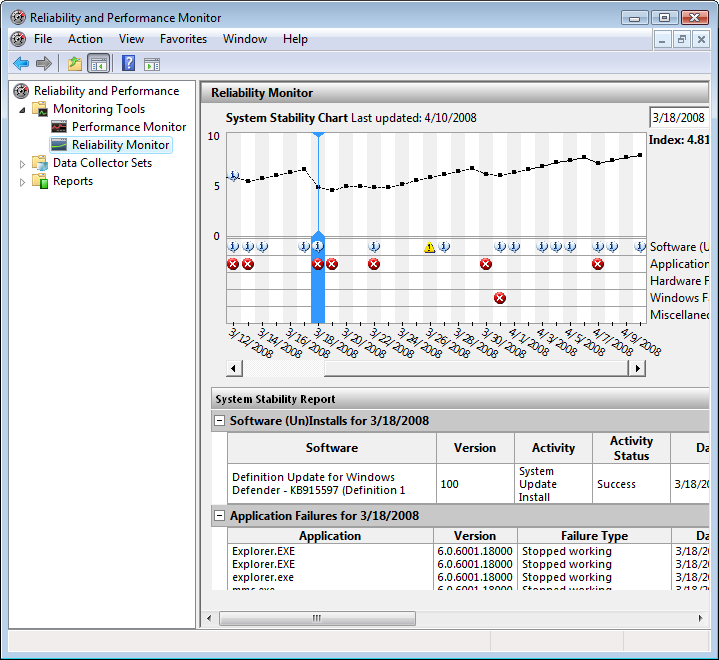
Open Reliability Monitor in Microsoft Management Console
Click Start, click in the Start Search box, type perfmon, and press ENTER.
In the navigation tree, expand Reliability and Performance, expand Monitoring Tools, and click Reliability Monitor.
1 comment
Comments from the original WordPress site, kept read-only.
Occasionally when a problem occurs you may be prompted to send information about the issue to Microsoft. This helps Microsoft to identify problems faced by users, and sometimes suggestions on how to fix the problem..