Three security tips for client virtual machines
How many of us have Automatic Updates configured and antivirus protection installed on client OS virtual machines used for testing? I hope most of you do, because an unprotected virtual machine in an enterprise environment carries the same risk as a physical machine. There is no difference between a virtual and a physical installation of Windows XP.
Recently, I installed Symantec AntiVirus 10.2 on my Windows XP virtual machine. I hope it protected me against the adware that was installed on the virtual machine, as shown below.
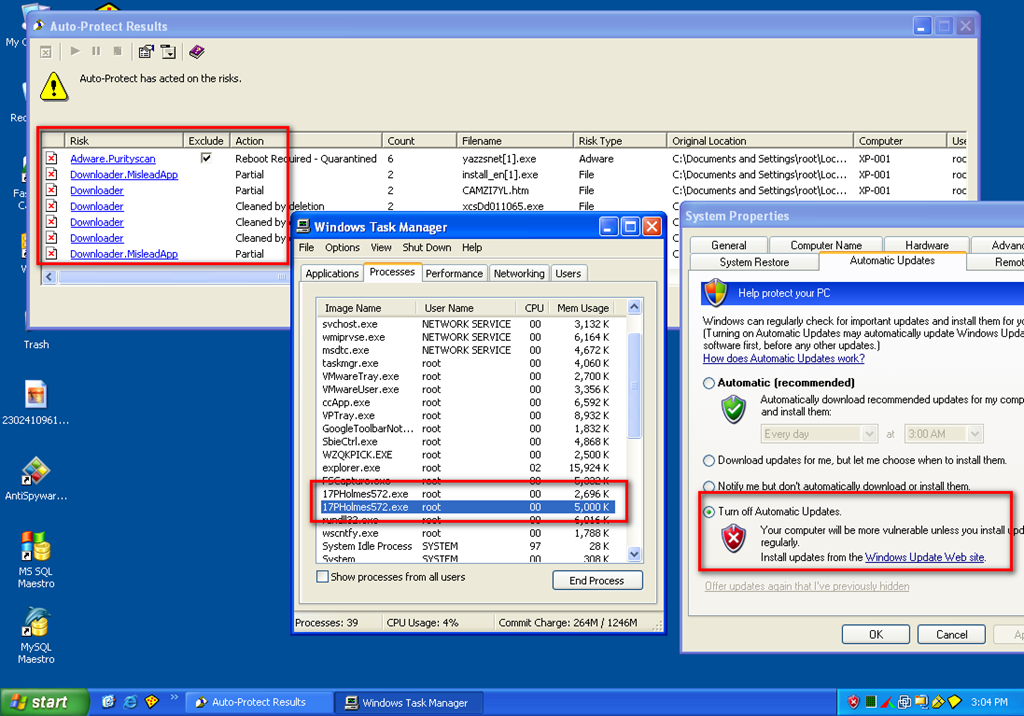
I was using a couple of Internet Explorer sessions to search for phpMyAdmin issues on one of my virtual machines. I searched Google and opened the top 10 results. While closing all the Internet Explorer instances, I received a popup about downloading an EXE file. Auto-Protect then reported that threats had been found.
I definitely did not install anything. After a reboot, the "AntiSpyware Master" application was installed without my permission. As an IT and security professional, I do not install programs I do not trust.
Google results for phpMyAdmin issues should not take me to malicious sites that exploit Windows vulnerabilities on my virtual machine.
Three security tips
- Install antivirus software on all virtual machines, including those running Linux. McAfee, Symantec, Kaspersy and NOD32 are a few examples. Use AVG if you want a free option.
- Download and install all Windows security patches and enable Automatic Updates. On Linux, update the distribution with tools such as
yum updateorapt-get update+upgrade. Do not forget applications such as Flash Player, Adobe Reader or WinZip; all applications are vulnerable at some point. On Windows, scan the virtual machine with Microsoft Security Base Analyzer (MBSA). - Do not use the administrator account. On Windows, use the built-in
runasfeature; on Linux, usesu.