Remove Active Directory without replication
A couple of minutes ago, I initiated the removal of Active Directory and forced the demotion of a virtual domain controller. It had not replicated for more than 60 days, and I could not get replication working. It took me more than 90 minutes to troubleshoot and fix the problem. Since Windows Server 2003, dcpromo has included an option to force the removal of Active Directory.
Force the removal of Active Directory
1. By default, Windows Server 2003 domain controllers support forced demotion. Click Start, click Run, and then type the following command: dcpromo /forceremoval2. Click OK. 3. At the Welcome to the Active Directory Installation Wizard page, click Next. 4. At the Force the Removal of Active Directory page, click Next. 5. In Administrator Password, type the password and confirmed password that you want to assign to the Administrator account of the local SAM database, and then click Next. 6. In Summary, click Next. 7. Perform a metadata cleanup for the demoted domain controller on a surviving domain controller in the forest.
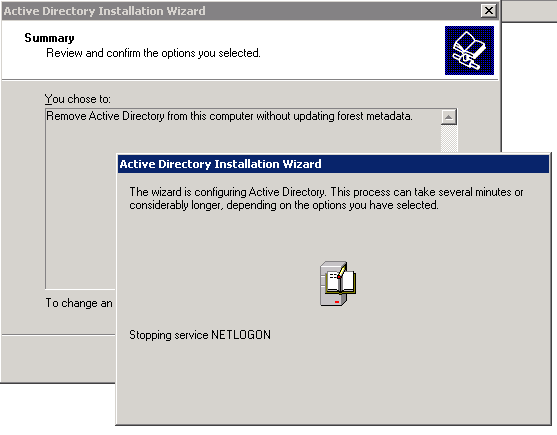
Reboot the server and clean up the metadata with ntdsutil. I dislike using a workaround like this, but I have no quick fix at the moment. I am planning and testing an upgrade of my Exchange 2007 server to SP1. Replication to the second domain controller had not taken place for more than 60 days, so replication stopped.
Replication error on the primary domain controller
Below is one of the errors on my primary domain controller. The demotion did not work with forced removal, and the registry fix described in option 3 did not resolve the problem either.
Event Type: Error
Event Source: NTDS Replication
Event Category: Replication
Event ID: 2042
Date: 4/27/2008
Time: 5:18:39 PM
User: NT AUTHORITY\ANONYMOUS LOGON
Computer: NET-DC-01
Description:
It has been too long since this machine last replicated with the named source machine. The time between replications with this source has exceeded the tombstone lifetime. Replication has been stopped with this source.
The reason that replication is not allowed to continue is that the two machine's views of deleted objects may now be different. The source machine may still have copies of objects that have been deleted (and garbage collected) on this machine. If they were allowed to replicate, the source machine might return objects which have already been deleted.
Time of last successful replication:
2008-01-26 20:26:04
Invocation ID of source:
01dcf6c8-f6b8-01dc-0100-000000000000
Name of source:
e02a9b21-b7e0-4be6-9cc9-971b00325f65._msdcs.Networknet.nl
Tombstone lifetime (days):
60
The replication operation has failed.
User Action:
Determine which of the two machines was disconnected from the forest and is now out of date. You have three options:
1. Demote or reinstall the machine(s) that were disconnected.
2. Use the "repadmin /removelingeringobjects" tool to remove inconsistent deleted objects and then resume replication.
3. Resume replication. Inconsistent deleted objects may be introduced. You can continue replication by using the following registry key. Once the systems replicate once, it is recommended that you remove the key to reinstate the protection.
Registry Key:
HKLM\System\CurrentControlSet\Services\NTDS\Parameters\Allow Replication With Divergent and Corrupt PartnerFor more information, see Help and Support Center at http://go.microsoft.com/fwlink/events.asp.
For more information, see the knowledge base article.