VMware Premium Support and a Linux Live CD
Over the last two days, I worked with a VMware Premium Support engineer on an ESX boot problem. I will post the exact error messages separately. We could not reach the Service Console, and the other two boot options did not work either. At one point, he asked whether I had a Linux Live CD. That took me back to old-school troubleshooting: I searched my case and found a BackTrack2 CD from two years ago.
After booting BackTrack, we checked a couple of system settings and logs. The engineer asked me to email esxcfg-boot.log. I was using the DRAC console, so copy and paste would not work. I remembered the tricks we used with IIS and, within a couple of minutes, transferred the original file to one of my tftpd daemons on the network.
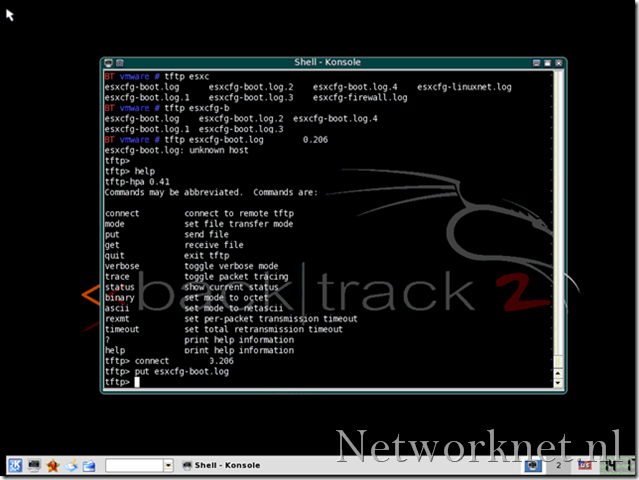
Retrieve the log files
- Download the ISO, burn it and boot from the CD-ROM.
- Log in with root/toor.
- I prefer the GUI, so I start KDE with “startx”.
- Open a console session.
- Run “ifconfig eth0 up”.
- Run “dhcpcd eth0”.
- Check the IP address with “ifconfig eth0”.
- Run “tftp”.
- Use “open ip address”.
- Use “put esxcfg-boot.log” to send that log, or send another file.
For more information and the download, visit http://www.remote-exploit.org/.