Hyper-V: Install the role from the command line

Hyper-V, a feature of Windows Server 2008, has been released to manufacturing (RTM) and is available for production deployment. I will use ServerManagerCMD.exe to install the Hyper-V role.
What is ServerManagerCMD.exe?
Server Manager in Windows Server 2008 provides a single source for managing a server's identity and system information, displaying server status, identifying problems with server role configuration, and managing all roles installed on the server.
ServerManagerCMD lets you install the Hyper-V role with one command. Make sure Windows Server 2008 RTM is installed and updated with KB950050.
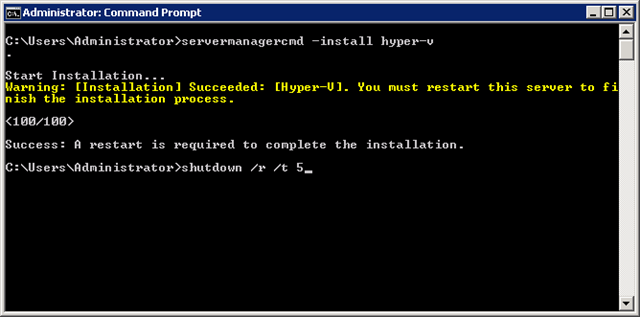
ServerManagerCMD.exe can install the following roles:
Active Directory Certificate Services
Active Directory Domain Services
Active Directory Federation Services
Active Directory Lightweight Directory Services
Active Directory Rights Management Services
Application Server
Availability and Scalability
DHCP Server
DNS Server
Fax Server
File Services
Hyper-V
Network Policy and Access Services
Print Services
Streaming Media Services
Terminal Services
Troubleshooting
UDDI Services
Web Server
Windows Deployment Services
Finally, there is a single command-line tool for this administrative task. I hate having different text files and running CMD batch scripts.