VMware ESX: Configure a Service Console IP address
VMware ESX provides command-line tools when installed with the Service Console, rather than ESXi. In this example, I will create a vSwitch, connect a physical network interface and assign an IP address to the Service Console management interface.
Create a virtual switch:
| |
Connect the first physical network interface to vSwitch0:
| |
The result of these two commands:
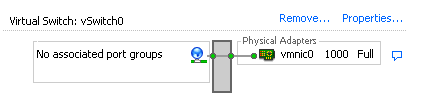
vmnic0, at 1000Mbps, is now associated with vSwitch0. Next, I want a Service Console port group on this virtual switch.
| |
This creates a port group named Service Console. Creating a port group is like defining an interface on a switch. I can then assign an L3 IP address to that interface/port group:
| |
This creates an L3 interface linked to the Service Console port group with a static IP address. ESX generates an L2 MAC address and assigns it to vswif2:
| |
The resulting configuration:
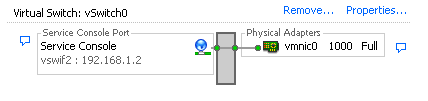
Using two built-in ESX command-line tools, I created a Service Console interface and assigned its IP address on the specified physical management network interface.
Command summary
| |
Related link
5 comments
Comments from the original WordPress site, kept read-only.
that is a great post, it really helped me. thanks
ekke85
It a great post,
is there a way to connect a service console to a vswitch without use a physical nic? I can do it with no problem from the VC
Great post.. Thanks
Thanks where helpful one..
I love this site! Thank you sooo much for all your posts!