Exchange 2007: Inbound mail fails with error 5.7.1
Inbound mail was not working on my Exchange 2007 server. I could send email, but every reply bounced.
During the migration, I configured a second MX record at my hosting provider. Undelivered email was forwarded to the second mail server. My Outlook client used that server’s POP3 mailbox, so everything appeared to work. After receiving delivery notifications from LinkedIn and Gmail, I started troubleshooting. Gmail returned this message:
Check the Receive Connector
After reading the message, I checked the Exchange 2007 Receive Connector and confirmed that Transport Layer Security (TLS) was selected.
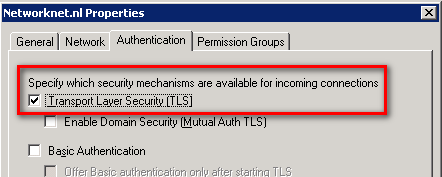
I cleared the TLS checkbox and applied the Receive Connector configuration. I sent another message from Gmail to my primary account, but it failed again.
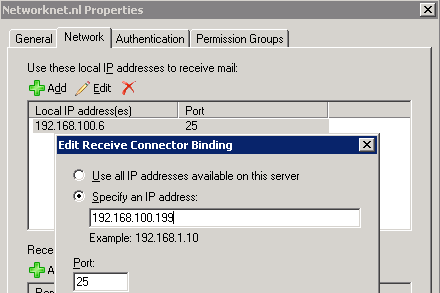
I returned to the Receive Connector and checked the Network tab. I ran ipconfig and saw that the IP addresses did not match. I changed the binding to the IP address assigned to the server. My test from Gmail then worked.
I cannot work out why the setting was wrong; I overlooked some details during installation. Still, I am happy that inbound mail is working—and that I am receiving lots of spam again.