
WordPress: XML-RPC services disabled
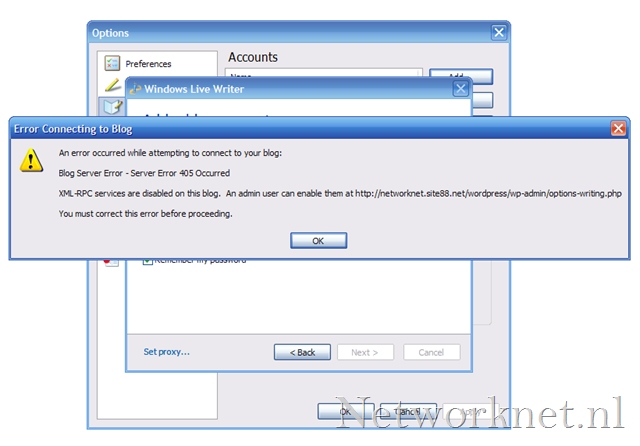
Registering a WordPress blog I had created some time earlier in Windows Live Writer failed after I entered the required settings. Writer returned this warning:
Error Connecting to Blog
Blog Server Error – Server Error 405 Occurred
XML-RPC services are disabled on this blog. An admin user can enable them at http. You must correct this error before proceeding.
WordPress developers disabled "Remote Publishing" by default from version 2.6 onwards. Networknet.nl had been running since version 2.5, so I had not encountered this before.
Enable Remote Publishing
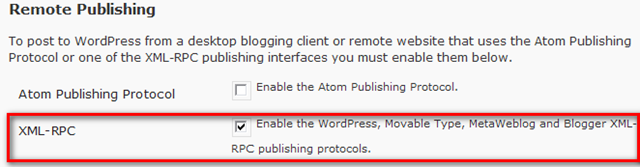
Sign in to the WordPress administration interface, go to Settings / Writing and select "Enable the WordPress, Movable Type, MetaWeblog and Blogger XML-RPC publishing protocols."
Related links
8 comments
Comments from the original WordPress site, kept read-only.
Thanks for the information, I was looking for it only.
Exactly the info I wanted. Thanks
Thanks for publishing this quick solution!
Thank you for this resolution.
But I have upgraded WP 2.9 and I have installed WLW now, its still making problem to connect even I have marked "check" as shown in above picture.
Waiting for ur repose, how to resolve it then ?
thanks a lot ! saved me heaps of time :)
Really thanks a lot for sharing the information. I searched a lot of sites for this issue buy you mentioned the clear steps to solve this issue.
I was shocked We have in no way thanked you pertaining to itemizing us as being a daily examine!
This could be a best web web site for anyone who would prefer to learn this certain topic matter.