Software deployment: Customize Adobe Reader with Adobe Customization Wizard
When preparing Adobe Reader for enterprise deployment, Adobe Customization Wizard helps customize its settings.
Adobe Customization Wizard is a free download-able utility designed to help IT professionals take greater control of enterprise-wide deployments of Adobe® Acrobat® and Adobe Reader®. With it you can customize the Acrobat installer and application features prior to deployment. Providing a graphical interface to the Windows Installer for Acrobat, the Customization Wizard enables IT administrators to:
- Modify the installer via a transform file (MST file) without altering the original package (MSI file)
- Customize the look and feel of Acrobat or Reader before deployment to meet the unique needs of your user base
Features in Adobe Customization Wizard
- Optimize the behavior of the installer by including silent installation, preserialization, multilingual, and custom setup choices
- Remove previous versions of Acrobat and Reader
- Suppress the EULA, registration prompts, and the Getting Started window
- Customize key application preferences — turn off automatic updates, add and set default job options, and customize collaboration and security settings
- Remove shortcuts from the desktop and the Start menu
- Edit each Adobe Acrobat application's registry and installer tables
- Customize file attachment handling within PDF files, including specifying which file types you want to block
- Add or edit files that will be installed, including customized JavaScript or plug-ins
- Preconfigure Acrobat Connect and disable it
- Preconfigure and lock Enhanced Security settings
- Deploy custom Portfolio navigators
- Add or remove custom redaction code sets
- And much more!
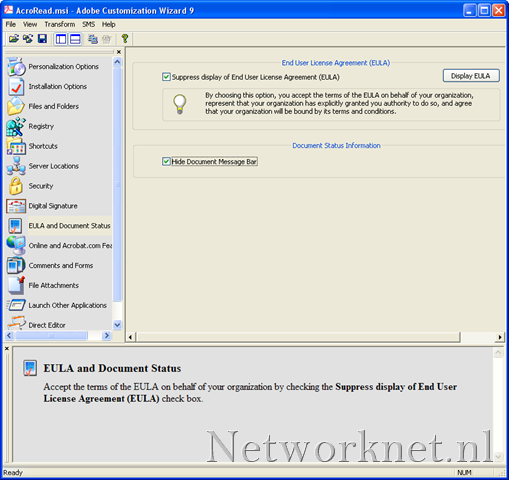
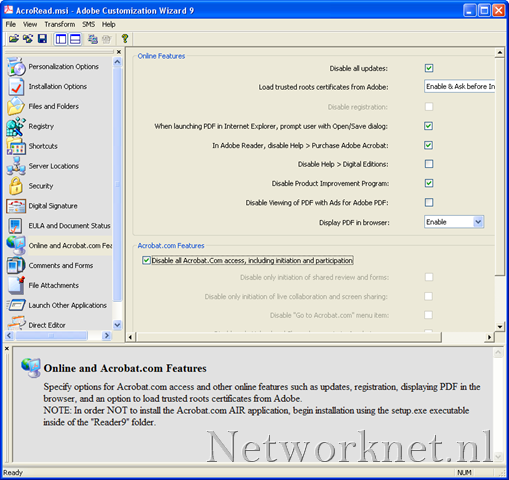
This tool helped me generate an MST file for an automated Adobe Reader installation. Disabling automatic updates and other application prompts is a common administration task. I created a CMD script to deploy the application to my clients using the MSI and MST files.
Related links
- Download Adobe Customization Wizard.