Software deployment: Install Microsoft Visio Viewer silently
Microsoft Visio is common in enterprise environments, but the cost of a license makes it unsuitable as a default installation on every client. Microsoft provides a small viewer for Visio drawings that integrates with Internet Explorer.
The Visio Viewer allows anyone to view Visio drawings and diagrams (created with Visio 5.0, 2000, 2002, 2003, 2007 or 2010) inside their Internet Explorer version 6.0 or later Web browser. Visio users can freely distribute Visio drawings and diagrams to team members, partners, customers, or others, even if the recipients do not have Visio installed on their computers. Internet Explorer also allows for printing, although this is limited to the portion of the drawing displayed.
I wanted to include this add-on on all my clients. A small script can distribute it automatically through your software distribution system; I prefer Microsoft's SMS/SCCM server.
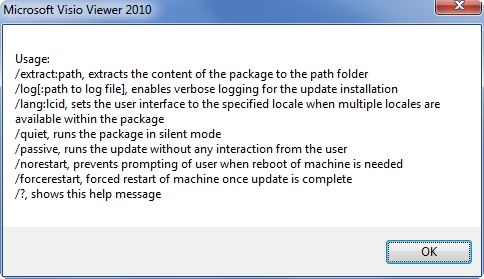
Install Microsoft Visio Viewer silently
- Download the installation file from Microsoft Download Center.
- Create a CMD file named visioviewer.cmd with the following contents:
| |
References
3 comments
Comments from the original WordPress site, kept read-only.
good
Hi vipin,
You are welcome.
Hi Ivan,
How to install Visio Viewer 2003 with Cd key embedded with the script. Thi should be done via sccm software distribution. Please help.