
WordPress: A slow intranet site behind a firewall
A WordPress 2.7 installation on my intranet was taking more than 30 seconds for every action in the administration area. I had downloaded it and installed it on an Ubuntu JeOS 8.04 virtual appliance.
I am a big fan of WordPress and had recently introduced it in my enterprise environment. This installation ran on a restricted network with no internet connection.
Initial configuration worked, but the administration area took minutes to respond. The virtual machine could not connect to internet services through the intranet firewall. The following changes brought page loading down to less than a second.
Disable internet requests from WordPress
- Go to ../wordpress/wp-includes and open http.php.
- Search for "function request( $url, $args = array() ) {".
- Add "return;" as shown in the example: "return;global $wp_version;".
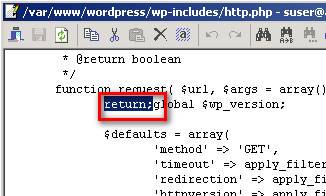
This disabled all internet interactions, which I did not need in this environment.
Reference
2 comments
Comments from the original WordPress site, kept read-only.
Nice one!!
Also working for me!
Keep up the good work!
I use this to tell their sites with wordpress 2.7x
Now how do I do this in Worpdress 3.0.1. There is this line function request ($url, $args = array ()...