Tools: Use ImgBurn without administrator permissions
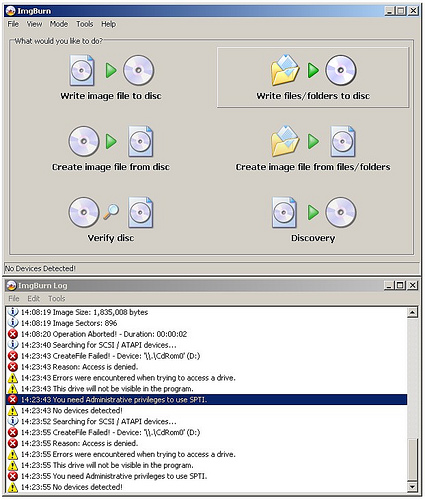
Recently, ImgBurn was scripted for an enterprise deployment. None of the end users are local administrators. With Nero, you could install NeroRights to provide the necessary privileges, but ImgBurn has no equivalent included. This required a small Group Policy change, which can be made in a local, site, domain or OU-level GPO.
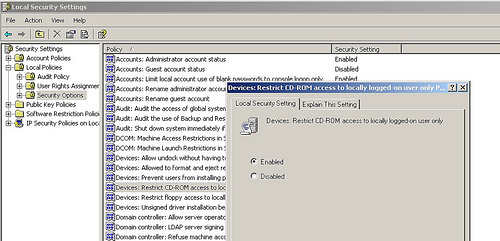
Start gpedit.msc as an administrator, go to Local Policies, Security Options, and set "Devices:Restrict CD-ROM access to locally logged on user only" to Enabled. Then log in as a user.
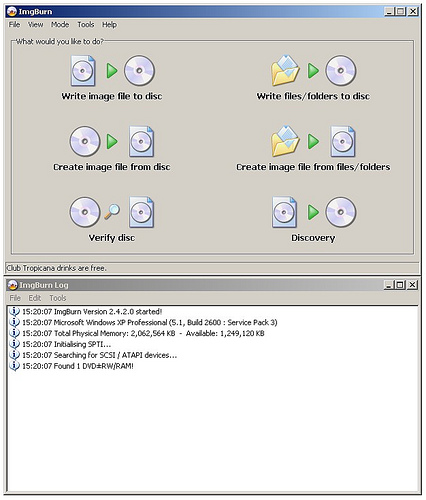
ImgBurn now found one drive, without local administrator permissions on Windows XP SP3.
2 comments
Comments from the original WordPress site, kept read-only.
Great! Thank you for this blog :-)
This was excellent! Now I just have to find out why Server 2008 cannot recognize my blank DVD even though Imgburn and Windows 7 can....