
Software deployment: Windows XP East Asian languages
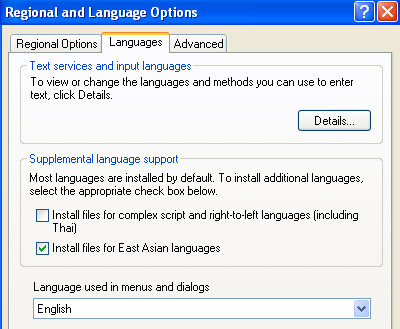
The East Asian languages option can be enabled during Windows XP installation through winnt.sif, or while preparing an image with Sysprep. My client did not have the checkbox selected in “Regional and Language Options” in Control Panel.
Changing that setting on more than 500 Windows XP clients calls for a silent installation. The following steps show how to do it after Windows XP has already been installed.
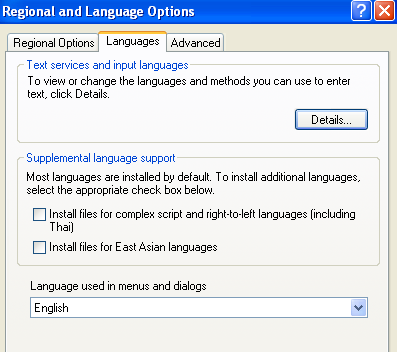
Install East Asian language files after Windows XP setup
- Create the text file c:\temp\east_asian.txt:
Code1 line 1[RegionalSettings] LanguageGroup="7","8","9","10" - Create the command file c:\temp\east_asian.cmd:
Code1 line 1reg add HKLM\SOFTWARE\Microsoft\Windows\CurrentVersion\Setup\ /v SourcePath /d \\server\share\windows_xp\ /f <br />%windir%\System32\rundll32.exe shell32,Control_RunDLL intl.cpl,/s:\\server\share\windows_xp\i386",/f:"C:\temp\east_asian.txt - Run east_asian.cmd.
Make sure the Windows XP source files are available on the network, as the installation needs them. The East Asian languages files were installed in five minutes.
4 comments
Comments from the original WordPress site, kept read-only.
This was actually really helpful for one of my overseas clients, thank you very much for the information.
Hi there! You are welcome. These steps helped me too to make sure our Asian users were able to use the XP client properly.
Do you know if you can add this setting in winnt.sif so on install from a en-US disk I have them enabled?
I am trying to use this but m not able to get it to work. it looks like it goes successfully but nothing changes.