Windows Server 2008 R2: Enable wireless networking
 Windows Server 2008 R2 does not enable wireless networking by default. Plug and Play can install available drivers, but that does not enable the wireless feature.
Windows 7 and Windows Server 2008 R2 can boot from a VHD on a local disk. I am building a standard image for testing and development, and I find the ability to boot different VHD files useful. Last night, I needed internet access to update the system’s patches and settings, but I had no wired connection.
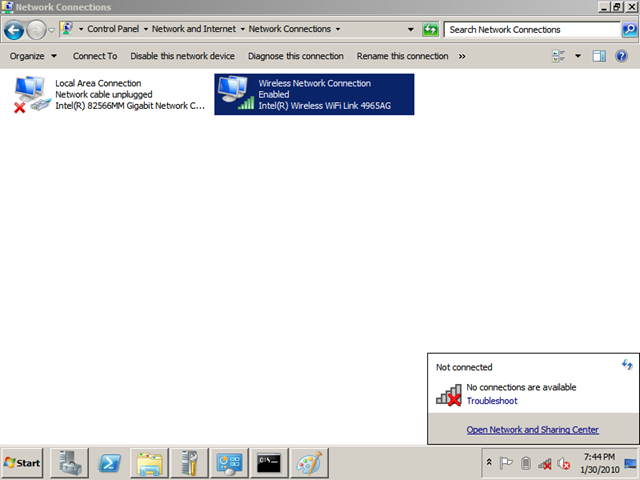
After checking my adapters, I saw that the system was not connected and no connections were available.
Enable the WirelessNetworking feature
DISM.exe (Deployment Image Servicing and Management) ships with Windows 7 and Windows Server 2008 R2.
DISM enumerates, installs, uninstalls, configures, and updates features and packages in Windows images. The commands that are available depend on the image being serviced and whether the image is offline or running.
Open an elevated command prompt and list the available features with “dism /online /get-features /format:table”.
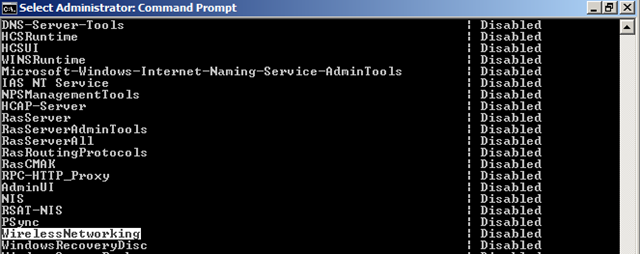
WirelessNetworking is disabled. To enable it, run “dism /online /enable-feature:WirelessNetworking”.
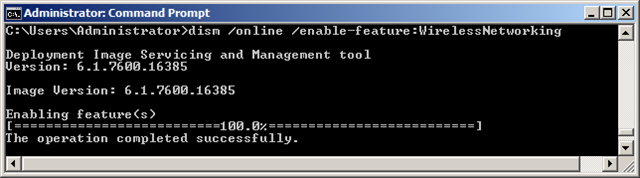
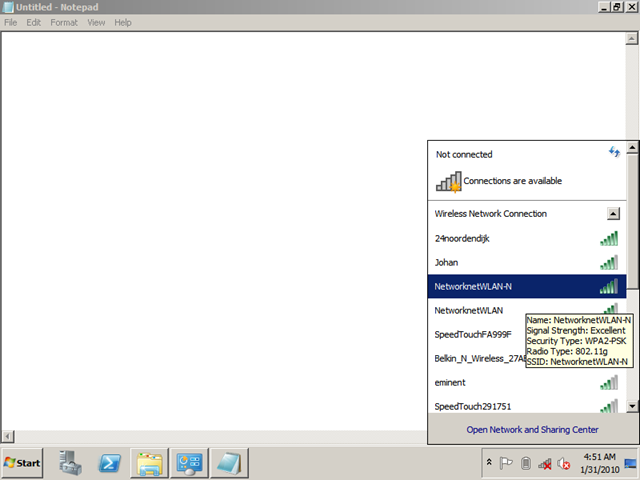
DISM enabled the WirelessNetworking feature. I then checked the available wireless network connections.
4 comments
Comments from the original WordPress site, kept read-only.
that odesnt work
it says something about wireless media is disconnected
It works Fine. you can't just type it in, you have to match the case. so its case sensitive
My brother recommended I might like this web site. He was totally right.
This submit actually made my day. You can not believe simply how so much time I had spent for this info!
Thank you!